Abstract
This article is an expansion of an existing research on the Flipped Classroom (FC) approach, adopted in five different primary schools in Cyprus and considering the experiences and perceptions of five teachers and 77 students (Loizou and Lee, 2020). It particularly expands in exploring the digital tools effectively used to teach primary school students through a FC. The FC approach is an innovative initiative which promotes blended learning methodology. It involves the use of digital technologies for developing and sharing flips/tutorials on the content traditionally taught through lecturing in class. Diverse technology tools have been used in FC research together with online learning platforms. The video tutorials, a basic form of a flip, are usually made by the educators with narration, text and enriched with various annotations and images. Many FC studies have added to the list of essential digital tools for FC implementation, especially the ones which showcase how flips can be developed. However, most of them have not indicated how can these be used for younger students, focusing mainly only in secondary or higher education. For example, how can the structure of a virtual learning environment can be simplified or how can administration of online documents in Drives be more suitable for young ages are scarcely explained. Hence, the significance of this study lies on the fact that research on the FC approach in primary education and the digital tools supporting it, has been so far kept to the minimum. Therefore, by collecting the experiences and perceptions of those involved in the process and assessing how the digital tools may or may not promote a positive learning experience could give an indication in how FC can be effectively implemented in primary education. A qualitative research methodology has been adopted by interviewing the five teachers and forming 11 different focus groups of students. Following the transcription, NVivo11 had been used for the thematic analysis. Research results have shown that the most effective digital tools can be categorized into software supporting: 1) Flips; 2) Activities in class; 3) Communication; 4) Entrance tickets; 5) Collaboration; and, 6) Assessment. These tools, recognized as simple and useful by students and teachers, have guided the creation of the ‟FC Technology tool” which incorporates examples for each category. Overall, a clear illustration of the kind of technology that could be used both at home and in-class for effective FC implementation in primary education is given in the study. Future studies should further evaluate how students can use these tools in forming their own flips and/or tutorials and be part of the pre and in-class session of FC learning classes.
Introduction
FC is ‟a pedagogical model in which direct instruction moves from a group learning space to an individual learning space, and the resulting group space is transformed into a dynamic, interactive, learning environment” (Hamdan, 2014). The growing research in utilizing FC instructional approach has therefore its grounds on the capability to enrich teaching and learning; to promote better students’ learning outcomes (Giannakos et al., 2014) and; to expand learners’ experiences and competences (Bergmann and Sams, 2012).
Flipped classroom (FC) models have indeed attempted to address contemporary issues of how student engagement can be maximized by allocating more class time for active and student-guided learning and by using advanced technologies to support a blended learning approach. A typical FC methodology offers students access to online video lectures/tutorials (flips) prior to in-class sessions and the need to complete an entrance ticket, so that they are prepared to take part in more interactive, collaborative and higher-order activities such as research, debates, problem solving and discussions, i.e. Inquiry-based leaning (IBL) methodology (Lage, Platt, and Treglia, 2000; Zappe et al., 2009; Bergmann, Overmyer, and Wilie, 2012; Fulton, 2012; Hughes, 2012; Talbert, 2012; Davies, Dean, and Ball, 2013).
Students benefit from this pre-class exposure to materials and outside classroom events because they can adjust their learning pace to meet their individual studying style and levels of understanding. During in-class classroom sessions, students have the opportunity to engage with the IBL activities, through group work, instead of passively listening to the teacher (i.e. lecturing). In turn, teachers can spend the in-class time for facilitation, observation of student performance and providing adaptive feedback to individual student or to groups of students (Fulton, 2012; Hughes, 2012; Herreid and Schiller, 2013).
‘The regular and systematic use of interactive technology’ (Strayer, 2012, p. 172) accepts unique FC approaches. However, there are counteracting studies (e.g. Rutherfoord and Rutherfoord, 2000; Tenneson and McGlasson, 2006) which claim that FC models are not new since educators have always used readings, and computer-assisted guidelines to get their learners prepared for the in-class activities. This study, which is an expansion of a FC research which aimed to collect experiences and perception of teachers and students (Loizou and Lee, 2020), challenges existing studies, as it comes to offer a new insight into the digital tools which can be further used, especially for students in primary education.
Literature Review
Diverse technology tools have been used in FC research together with online learning platforms. The video tutorials, a basic form of a flip, are usually made by the educators with narration, text and enriched with various annotations and images, e.g., Love, Hodge, Grandgenett, and Swift (2014) have used LaTex beamer package; Davies et al. (2013) have used MyITLab videos and McLaughlin et al. (2013) Echo369 Classroom Capture. Widely accessible tools, such as iTunes and YouTube are employed for the creation and sharing of the videos (Kotlik, 2014). The Khan Academy has also created a digital video library for K-12 students by extending the type of ready-made online resources available for flipped learning (Hao, 2016). Other tools for sharing the flips (text, picture or videos) are also used to facilitate distance learning, such as blogs (e.g., Roach, 2014), wikis, Learning Management Systems (LMSs) or Virtual Learning Environments (VLEs), online platforms (e.g., Baker, 2000; Pempek, Yermolayeva, and Calvert, 2009) and Blackboard Journal page (Talley and Scherer, 2013). Hung (2015) has used WebQuests for promoting active learning whereas Kim, Kim, Khera, and Getman (2014) and Kong (2014) enhanced collaboration through Google Docs and Google Hangouts, after watching video lectures on Youtube. Other online software such as T1-89 graphing calculator (McGivney-Burelle and Xue, 2013) and interactive television (Missildine, Fountain, Summers, and Gosselin, 2013) have been used.
Many of these studies have added to the list of essential digital tools for FC implementation, especially the ones which showcase how flips can be developed. However, most of them have not indicated how can these be used for younger students and under which circumstances they can promote basic learning features such as communication and collaboration, focusing mainly only in secondary or higher education. For example, how can the structure of a virtual learning environment (VLE) be simplified or how can administration of Google Docs or Hangouts be more suitable for young ages are scarcely explained. Moreover, digital video libraries (e.g. Khan academy) are useful for English-speaking students only. This means that teachers’ choice for ready-made flips is very limited for delivering content in another language.
Research Questions
All in all, currently, Technology-Enhanced Learning (TEL) research involving a specific area of FC has focused on higher education with minor exceptions (
Hultén and Larsson, 2016;
Kim and Chin, 2011). Minimum research in primary education has tried to understand how such a model is implemented with the young learners. Hence, the need for undertaking this research was to gain knowledge in how FC can be used effectively from the perspective of teachers and students using it in a research study of FC implementation (
Loizou and Lee, 2020). Here, it has been chosen to present the results on the digital tools and technologies needed to accomplish that, given that no research on the kind of technology used at this young age exists. Therefore, this research paper answers to the following research questions, which form a sub-section of the questions and results of the main research (
Loizou and Lee, 2020):
a) What are the perceptions and experiences of teachers on the kind of digital tools used for an effective implementation of an FC model?
b) What are the perceptions and experiences of students on the kind of digital tools used for an effective implementation of an FC model?
Research Methodology
The participants for this FC research (Loizou and Lee, 2020), chosen upon availability and willingness to implement the research model, have been five different teachers who worked in five different primary schools in Cyprus, composing the five different case studies (CS1-CS5). The 77 students of these teachers have been added to the sample of this action research study. In Table 1, information on each case study is given, presenting details on students’ and teachers’ profile. The level of ICT competency was expected to influence the choice of digital tools during the FC designs and implementation. Teachers had implemented the model in at least three learning cycles of each subject they taught. These inclused Greek language, Mathematics, Science, History, Geography and English as a second language.
TABLE 1
| Case Study | School profile | Students’ profile | Teacher profile | ||||||
|---|---|---|---|---|---|---|---|---|---|
| Urban-Rural | Total # students | Grade | # students in class | ICT completency | Age/Gender | Years of teaching experience | Education | ICT competency | |
| CS1 Tesa’s classroom | Rural | 30 | 3 and 4 (mixed) | 10 | Basic*-Good | 37/F | 15 | BA Primary Education MA ICT and Education | Very good |
| CS2 Rosemary’s classroom | Urban | 280 | 3 | 19 | Basic* | 41/F | 18 | BA Primary Education MA ICT and Education | Excellent |
| CS3 James’ classroom | Urban | 115 | 6 | 8 | Basic* | 40/M | 15 | BA Primary Educatio BA Sociology MA Educational Leadership | Very good |
| CS4 Ben’s classroom | Urban | 298 | 6 | 23 | Good | 41/M | 18 | BA Primary Education MA Curriculum and PhD Information and Communication Systems | Excellent |
| CS5 Mary’s classroom | Suburban | 202 | 6 | 17 | Very good (pilot CS) | 37/F | 15 | BA Primary Education MA ICTand PhD candidate: E-Research and TEL | Excellent |
Case studies-profile analysis.
The research is designed to gain better understanding of the FC methodology and hence it should have been exploratory. The following various sources of qualitative evidence/data collection have been employed for this research:
a) Documents: The learning FC design reports/lesson plans and documents were uploaded on the Moodle platform created (http://www.protyposxoleio.com) so the learning process and content could be accessible to students and were shared among all participant teachers. A total of 70 FC lesson plans were created and analysed.
b) Archival records: Educational Policy (MOEC, 2019); TEL policy in Cyprus; Infrastructure management policy; Wi-Fi policy.
c) Teacher Interviews and student focus groups: In-depth focused semi-structured from teachers and students.
• The five participant teachers were interviewed individually, and each interview lasted approximately 40 min.
• All participant students (n = 77) were separated into focus groups of four to six, depending on the number of students in each case study. In Tesa’s classroom, students in Grade 3 were interviewed separately from students in Grade 4. A total of eleven student focus groups were conducted from all five case studies and all data was recorded and transcribed.
d) Classroom/lesson observations: Classroom observations were recorded on camera (video and photos) and notes were also taken on the observation protocols, focusing on the technology used: devices, internet connection, applications/software. A total of 30 lesson observations were made.
e) Reflections and insights of each educator on the ‘Teacher’s reflection page’ on Moodle were collected. Reflection questions focused on positive and negative aspects of the lesson.
Choosing from several approaches that could be appropriate for this kind of research, thematic analysis was the most suitable ror looking at patterns, explanations, event analysis and cross-case analysis to reach intepretations and conclusions. Hence, Nvivo11, a qualitative research software, assisted in managing all the different data collected, following Creswell’s (2009) Steps one to four, walking through themes, nodes, patterns, flowcharts and key issues arising. All measures were taken during data collection and analysis to keep the identity of participants anonymous. This includes the use of random code numbers instead of student names (e.g., S1. for CS1, S2. for CS2 etc.) and the coding T1-T5 with corresponding pseudonyms for teachers (Table 1).
Research Results
Following data analysis of the FC research, a lot of themes on FC implementation were identified (Loizou and Lee, 2020). However, focusing on the digital technologies here, Table 2 presents a brief description of each of the most widely used digital tools during FC implementation and in which case study each has been used. In general, Moodle activities/tools have been widely used and a common Google account for each class/case study was created and assisted towards lesson orchestration. The use of Google Docs and Slides was very common practice as it allowed simultaneous editing, unlike Moodle wikis, and therefore enhanced group work. The classroom Google account supplemented Office 365 and gave the option to the students to work online for free. Moreover, the digital tools for creating the flips were Screen-O-Matic and Camtasia, both sharing similar features, like screencasting, live-camera window, highlighters and arrow options, speech balloons and many other annotations. Camtasia is a more professional software with extra features, such as multiple screens, but it is not open source. It was therefore used solely in Mary’s classroom.
TABLE 2
| Tool | Use | Case study |
|---|---|---|
| Moodle Forums | Creating discussion threads: Used for answering questions, commenting, posting drafts or final work, self and peer assessment | CS1, CS2, CS3, CS4, CS5 |
| Moodle Chats | Real time discussion: Students discussed a certain topic (entrance ticket) or used it for note-taking during group work | CS1, CS2, CS5 |
| Moodle wikis | Collaborative creation of text, lists etc. It did not allow multiple users at the same time. It was used for afternoon work only | CS1, CS3, CS4, CS5 |
| Moodle Quiz | Creating questions such as multiple choice, short-answers, true/false. Used as entrance or exit ticket and assessment of in-class work | CS3, CS4, CS5 |
| Moodle Glossary | A glossary is created in alphabetical order by creating new entries. Used for new concepts/words (vocabulary lists) and links/multimedia were also added | CS1, CS3, CS5 |
| LightBox Gallery | Students comment on photos. The teacher used photos as a flip in the place of a video | CS4 |
| Moodle Games | Creating interactive games. Used for text comprehension and more depth in building new vocabulary | CS4, CS5 |
| Moodle badges | Student reward for promoting motivation and engagement | CS4 |
| Screencast O′ Matic/Camtasia | Flip creation | CS1, CS2, CS5 |
| Drill & Practice | Quizzes and games for practicing grammatical rules, vocabulary, math calculations etc. | CS1, CS2, CS3, CS4, CS5 |
| Google Drive | Online classroom depository: The teacher and the students used it as a common space to upload and share their work (used a class Google account) | CS1, CS2, CS3, CS4, CS5 |
| Google Docs | Online text processing: Students created a text file using the classroom’s Google account (enhanced continuity and collaboration) | CS1, CS2, CS3, CS4, CS5 |
| Google Slides | Online slide creator: used for sharing group work and presentations | CS1, CS3, CS4, CS5 |
| Google Forms | Online surveys/quiz creator: used during IBL activities and/or as entrance ticket or for assessment | CS1, CS3, CS5 |
| Blogger | Blog creator: Students posted comments on the classroom’s blog or created their own blog for group activities etc. | CS5 |
| Office 365 | Word, PowerPoint, Excel, OneNote: Partially used (not installed on all devices). Supplemented by Google Drive/Docs/Slides etc. | CS1, CS2, CS3, CS4 |
| Mahara | E-portfolio development (through a process of a ‘learning journal’) | CS5 |
Digital tools used during FC implementation.
In-class creative assignments included the use of many other applications and software, not included in Table 2, such as Voki (avatar creation), Glogster (interactive poster creation), Wordle (cloud words), Purpose Games (online game creation), Scratch (programming language-robotics) etc. Mahara has been used extensively and successfully in Mary’s classroom as an e-portfolio platform. The final portfolio took the form of the lesson’s exit ticket and/or substituted a traditional test for further assessment purposes.
Thematic analysis which has considered teachers’ and students’ experiences and perceptions regarding the use of the above tools has shown that the most effective of these can be categorized into software supporting: 1) Flips; 2) Activities in class; 3) Communication; 4) Entrance tickets; 5) Collaboration; and, 6) Assessment. These tools, recognized as simple and useful by students and teachers, have guided the creation of the ‘FC Technology tool’ (Figure 1). A VLE or a Learning Suite is recognized as a general management tool of higher value, with embedded Students’ and Parents’ page.
FIGURE 1
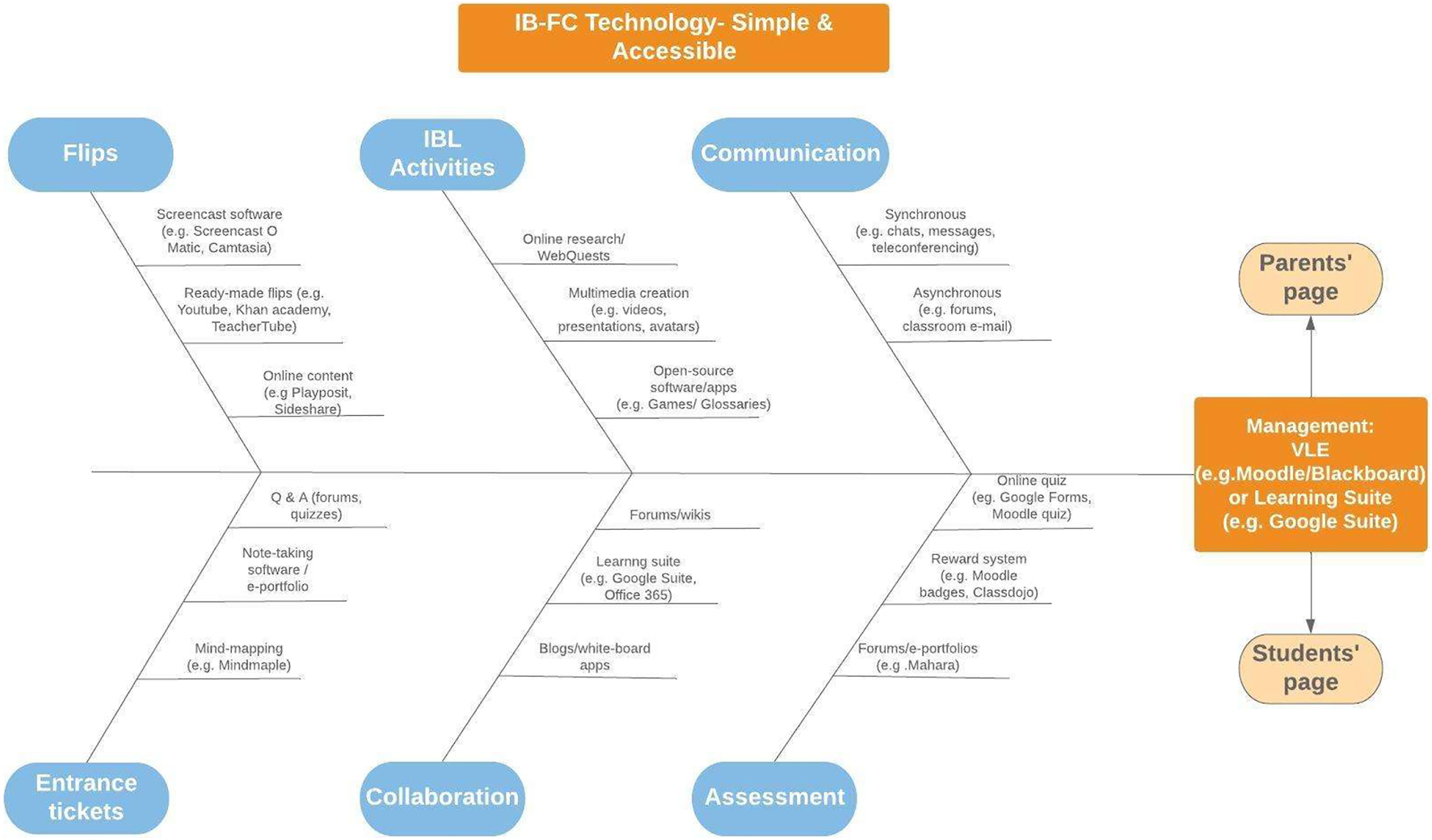
FC Technology tool: Simple and Accessible.
An important step towards IB-FC implementation is the use of simple and universally accessible technologies so that students are able to use them and the teachers feel confident to solve technical issues aroused. The technological competence they should attain usually provides stress to the teachers. Teachers with better ICT skills and greater experience in ICT integration (e.g. Ben and Mary) were able to better adapt to problems arising during lesson time, whereas others usually asked their students to work offline or in pairs.
Flips
In particular, all teachers in the research have mostly used ready-made video-tutorials to serve as flips, instead of preparing their own. Youtube, TeacherTube and Khan academy were mentioned by teachers as the most popular websites for ready-made video-tutorials. However, most of the teachers would choose to translate those instead of creating new ones, e.g., ‘Tutorials in Greek are not that many but you could spot some good ones, mainly on Teacher-Tube, if you had done a better research’ (Rosemary). It was also recorded how easy it was to do a voice over, e.g. ‘I just downloaded a ready-made presentation and if it was in a different language, I would use Camtasia for a narration after I muted the initial one’ (Mary). Teachers and students also believed that ‘…the best flips were the videos which periodically paused on their own and posed direct questions to us’ (S4.16), e. g., through the use of Vizia (https://vizia.com), an interactive video-creation online software.
Entrance Tickets
The term ‘entrance ticket’ refers to the activities the students had to complete after watching/studying the flip/flips given at home. These activities are assigned together with the flips in order to make sure the students actually watch/study them and are well-prepared (if the entrance ticket is correctly completed) for the next day’s lesson in class. Teachers claimed that their choice in preparing particular entrance tickets always had to do with lesson goals and Moodle activities/tools. As Figure 2 illustrates, Moodle activities were mostly used as they offered a good selection (chats, wikis, quizzes, forums etc.) whereas ‘any others unquestionably demanded more time to prepare’ (James). Teachers emphasized the importance of assigning alternative kinds of activities using other online tools (besides the ones embedded on Moodle), as Figure 2 also evidences, e.g. ‘Sometimes they [the entrance tickets] had to do with completing mind maps … finding keywords and writing a short review, taking a quiz, getting prepared for a personal interview etc.’ (Mary). Overall, the entrance activities which the students recalled during the interview as their favorite involved descriptions (S4.15), advertisement creation (S3.5), dealing with Math applications (S3.6), answering questions on Moodle (S3.2), taking notes or commenting on the video (S5.13), creating glossaries (S3.5), playing games (S4.19), developing multimedia such as puzzles (S5.14) and story-telling (S5.11). The most innovative activity was when students were asked to create their own video-tutorials aimed for their fellow classmates. For example: ‘The tutorials we have created ourselves. We worked in pairs and Miss M. showed us how Camtasia works. So, we did it!’ (S5.4). Students also enjoyed the fact that the assignment was directly sent to their teacher (S3.8) and/or made visible to their peers for the option to receive peer feedback, e.g. ‘… questions on Google Drive’ (S3.2). It also sounded a good idea to create the tasks themselves, such as quizzes for the other classmates, or even play educational games rather than writing up answers to questions, e.g. ‘Let’s say to play a Math game, or a Greek game, crossword, online board games … ’ (S5.17).
FIGURE 2
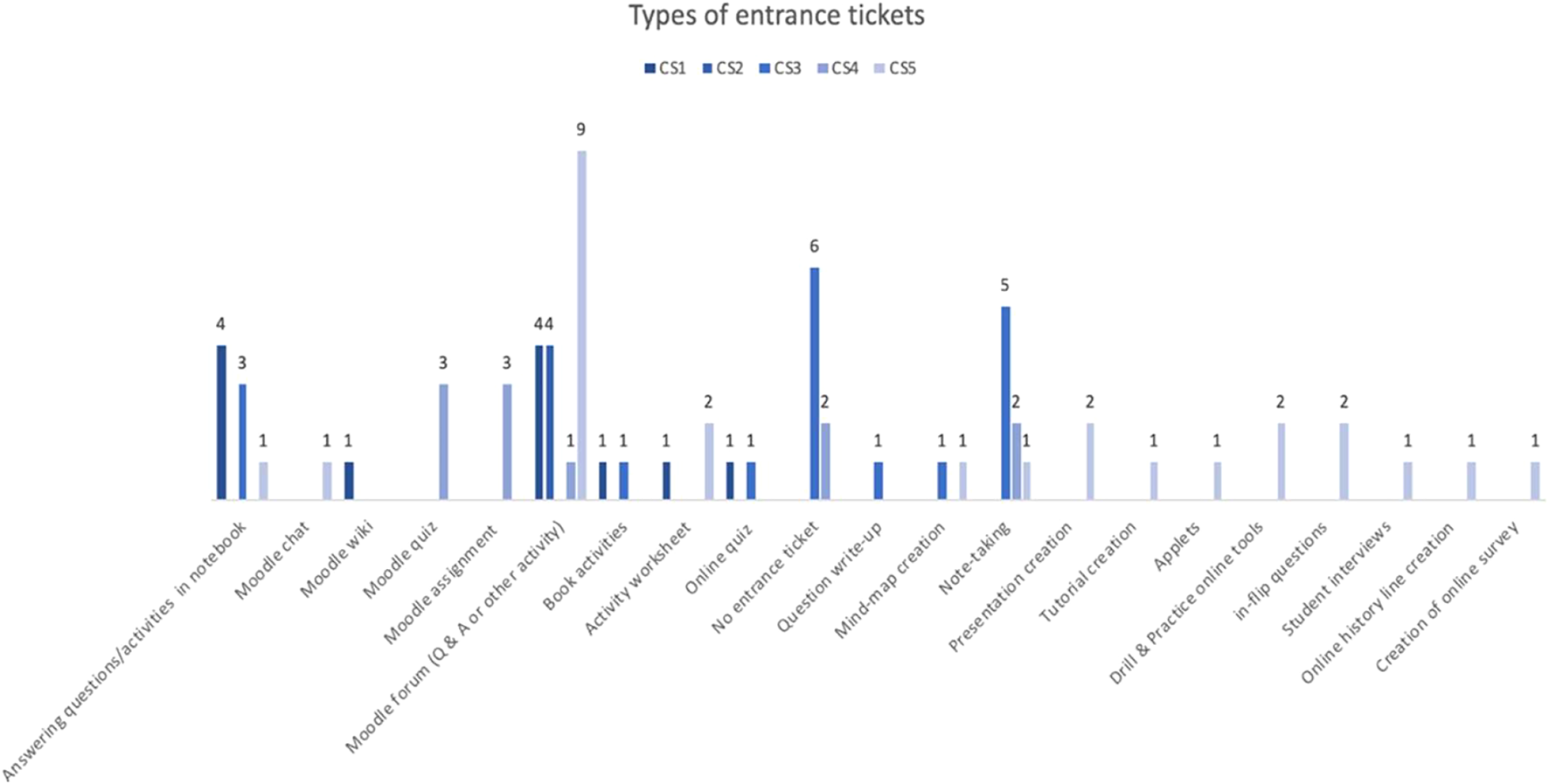
Types of entrance tickets used in all case studies.
IBL Activities
The IBL activities mostly involved online research or WebQuests for the younger ones (e.g., ‘It has always been easier to use guided research for the Year three students’, Tesa), whereas all students were mostly excited with multimedia creation, ‘It was the best when we had to create videos, presentations or a Voki thing’ (S4.2). Teachers’ experiences in creating IBL activities mostly focused on how Moodle tools have been used since ‘…they (Moodle forums) had been very easy to use’ (James). Teachers specifically mentioned how forums were useful for asking their students to answer questions, post comments on flips, give feedback to their peers or post comments of individual or group research any time during the learning process.
Communication
Synchronous and asynchronous forms of communication, through chats, teleconferencing, forums assisted both pre-class and after-class for ‘…addressing misconceptions’ (James), ‘…keep students engaged’ (Ben), and as most students have quoted, ‘Our teacher felt like he was always there’ (e.g., S3.15).
Collaboration
Most students preferred working in online groups (e.g. through forums, wikis, learning suites, blogs and whiteboard apps) since they could combine their personal input from the flips they have watched at home and complete in-class activities more easily. They also suggested that they should cooperate even more with each other so they can share the workload and have improved outcomes in lesser amount of time given that the digital tools support that, e.g. their classroom online Drive. This has been evident in many quotes (n = 18), such as:
‘Depends on what but I usually prefer teamwork … if we have to do lots of slides, I don’t think I could do it myself, someone would have to help me and give his own ideas from the flip.’ (S5.17)
Assessment
Teachers pointed out multiple assessment methods applied during implementation, sometimes ‘…adopting all of them according to the kind of assignment’ (Mary) or ‘…selectively according to students’ skills’ (Ben). Lesson plan analysis showcased that the main assessment methods have been teacher and online assessment methods, ‘Especially the development of e-portoflios on platforms such as Mahara’ (Tesa). Computer or online assessment methods, either through Moodle or other Drill and Practice online tools also worked for the students. Observation notes strongly emphasized how students get more excited with online assessment versus a hard copy, achieving high scores, also evident in interview quotes: e.g. ‘We liked it better. And let’s say it was more pleasant/joyful because we were feeling different from the other classrooms.’ (S4.19). What was highly important for any kind of after-class assessment method was the continued possibility for instant or real-time online feedback, ‘…not feasible with paper-based assignments’ (Rosemary).
Discussion and Conclusion
It has been evident from FC literature in secondary and higher educaton so far that there are widely accessible tools for the creation and sharing of flips, e.g. Youtube, iTunes (Kotlik, 2014) together with digital video libraries e.g. Khan Academy (Hao, 2016). Indeed, findings from this study indicated that most teachers preferred using or modifying ready-made flips as it was both easier and less time-consuming. The entrance tickets were mainly created using Moodle tools, especially Moodle forums.
The built-up and use of a well-structured VLE, which can be used for the upload and sharing of content (flips, entrance/exit tickets, guide and links for IBL activities), facilitates effective implementation of FC methodology (e.g., Baker, 2000; Pempek et al., 2009; Talley and Scherer, 2013). It can also help young students deal with the investigation procedure of IBL activities (Magee and Flessner, 2014). Most importantly, teachers should choose a VLE which works on all devices and guide students through it.
Other digital technologies, suitable for the age of the students can support such innovative pedagogical designs (Lyons, 2008), e.g., the use of Google Docs and Google Hangouts, used in the research of Kim et al. (2014) and Kong (2014). IBL activities included the built-up of multimedia, online research, use of Drill and Practice apps and argumentative writing. Teachers aimed to use simple and accessible technology, exploiting Moodle tools (especially forums for sharing questions, comments, feedback etc.) and other open-source software (e.g., preparing a Google slides presentation).
Overall, a clear illustration of the technology and guidelines on how it could be used both at home and in-class should be given from the beginning. During the preparation of the FC learning designs, educators have to make sure that the flips (videos, presentations, online sources) can open on all devices as young students cannot solve compatibility issues on their own. Students have been overall very positive in relation to the technologies used. Their perceptions have been very important to consider within FC implementation so they would not feel helpless and discouraged (Loizou and Lee, 2020; Mason et al., 2013), but satisfied and willing to work (Zhai et al., 2017).
This research aimed to study actual FC implementation in primary school settings (Loizou and Lee, 2020). It found that teachers and students have mostly positive experiences and perceptions. Overall, students were satisfied with the FC activities, they all enjoyed the flips and many agreed that the class time interaction through the IBL activities was key to their understanding. Students and teachers perceived that the FC activities become more interesting, motivating and engaging, especially with the use of technology and particular digital tools, than traditional class. Teachers enjoyed the design and implementation process and they were willing to offer all the support and guidance the students needed throughout the learning process, through specific software and applications. These findings are in line with many others previous studies.
Contrary to many previous published studies, however, the present study is distinctive in the following ways. First, it tested the feasibility of implementing FC in a primary school context, through an action research methodology within multiple case studies. A majority of previous studies did not explicate any specific ‘digital tools’ conceptual framework to help instructors design their FCs at any level of education (Bishop and Verleger, 2013; Giannakos et al., 2014), not even the few studies which existed in primary education (Aidinopoulou and Sampson, 2017; Gough et al., 2017; Hultén and Larsson, 2016; Kostaris et al., 2017).
Moreover, it is the first time a FC model has been implemented at any level within the educational context of Cyprus. The ‘FC Technology Tool’ (Figure 1) developed could help guide future FC research in how the flips, the entrance tickets, IBL, collaboration, communication and assessment tools can better promote student engagement and achievement levels, by choosing simple and accessible digital tools for the young learners.
Statements
Author contributions
The author confirms being the sole contributor of this work and has approved it for publication.
Acknowledgments
I would also like to express my deepest gratitude to all the educators who have agreed to be part of this research, by implementing a completely new teaching model, and whom have spent a whole school year in the design and delivery of the FC learning instructions. Sincere thanks go to all the participant students and their parents who agreed for their children to take part in this research project. Without their participation, completing this study would not be possible. Special appreciations go to the Cyprus Ministry of Education and Culture (MOEC) and the Cyprus Centre of Educational Research and Evaluation (CCERE) for granting ethical approval for this research, and hence access to schools and private archives of students. Finally, I would like to thank the Cyprus Pedagogical Institute (CPI), MOEC and the National and International UNESCO Commission for nominating me and this research for the international “UNESCO ICT in Education Prize, 2018”.
Conflict of interest
The author declares that the research was conducted in the absence of any commercial or financial relationships that could be construed as a potential conflict of interest.
Publisher’s note
All claims expressed in this article are solely those of the authors and do not necessarily represent those of their affiliated organizations, or those of the publisher, the editors and the reviewers. Any product that may be evaluated in this article, or claim that may be made by its manufacturer, is not guaranteed or endorsed by the publisher.
References
1
Aidinopoulou V. Sampson D. G. (2017). An Action Research Study from Implementing the Flipped Classroom Model in Primary School History Teaching and Learning. Educ. Technology Soc.20 (1), 237–247.
2
Baker J. W. (2000). “The “Classroom Flip”: Using Web Course Management Tools to Become the Guide by the Side,” in Selected papers from the 11th International Conference on College Teaching and Learning, Jacksonville, Florida, April 12-15, 2000. Editor ChambersJ. A. (Scotland: Center for the Advancement of Teaching and Learning), 9–17.
3
Bergmann J. Overmyer J. Wilie B. (2012). The Flipped Class: Myths versus Reality. London: The Daily Riff. Retrieved from http://www.thedailyriff.com/articles/the- flipped-class-conversation-689.php.
4
Bergmann J. Sams A. (2012). Flip Your Classroom: Reach Every Student in Every Class Every Day. Eugene, OR: International Society for Technology in Education.
5
Bishop J. L. Verleger M. A. (2013). “The Flipped Classroom: A Survey of the Research,” in Proceedings of the 120th ASEE National Conference (Atlanta, GA: ASEE), 1–18.
6
Cheryl P. Talley C. P. Stephen Scherer S. (2013). The Enhanced Flipped Classroom: Increasing Academic Performance with Student-Recorded Lectures and Practice Testing in a "Flipped" STEM Course. J. Negro Education82 (3), 339–347. 10.7709/jnegroeducation.82.3.0339
7
Creswell J. W. (2009). Mapping the Field of Mixed Methods Research. J. Mix. Methods Res.3 (2), 95–108.
8
Davies R. S. Dean D. L. Ball N. (2013). Flipping the Classroom and Instructional Technology Integration in a College-Level Information Systems Spreadsheet Course. Education Tech Res. Dev61 (4), 563–580. 10.1007/s11423-013-9305-6
9
Hamdan N. (2014). What Is Flipped Learning: The Four Pillars of F–L–I–P™. Retrieved from http://flippedlearning.org/cms/lib07/VA01923112/Centricity/Domain/46/FLIP_handout_FNL_Web.pdf.
10
Fulton K. (2012). Upside Down and inside Out: Flip Your Classroom to Improve Student Learning. Learn. Leading Technology39 (8), 12–17.
11
Giannakos M. N. Krogstie J. Chrisochoides N. (2014). “Reviewing the Flipped Classroom Research: Reflections for Computer Science Education,” in Proceedings of the Computer Science Education Research Conference (New York, NY: ACM), 23–29.
12
Gough E. Dejong D. Grundmeyer T. Baron M. (2017). K-12 Teacher Perceptions Regarding the Flipped Classroom Model for Teaching and Learning. J. Educ. Technology Syst.45 (3), 390–423. 10.1177/0047239516658444
13
Hao Y. (2016). Middle School Students' Flipped Learning Readiness in Foreign Language Classrooms: Exploring its Relationship with Personal Characteristics and Individual Circumstances. Comput. Hum. Behav.59, 295–303. 10.1016/j.chb.2016.01.031
14
Herreid C. F. Schiller N. A. (2013). Case Studies and the Flipped Classroom. J. Sci. Teach.42 (5), 62–67.
15
Hughes H. (2012). “Introduction to Flipping the College Classroom,” in Proceedings from world conference on educational multimedia, hypermedia and telecommunications, 2012. Editors AmielT.WilsonB. (Chesapeake: AACE), 2434–2438.
16
Hultén M. Larsson B. (20162016). The Flipped Classroom: Primary and Secondary Teachers' Views on an Educational Movement in Schools in Sweden Today. Scand. J. Educ. Res.62, 433–443. 10.1080/00313831.2016.1258662
17
Hung H.-T. (2015). Flipping the Classroom for English Language Learners to foster Active Learning. Computer Assist. Lang. Learn.28 (1), 81–96. 10.1080/09588221.2014.967701
18
Kim M. Chin C. (2011). Pre-service Teachers’ Views on Practical Work with Inquiry Orientation in Textbook- Oriented Science Classrooms. Int. J. Environ. Sci. Education6 (1), 23–37.
19
Kim M. K. Kim S. M. Khera O. Getman J. (2014). The Experience of Three Flipped Classrooms in an Urban university: An Exploration of Design Principles. Internet Higher Education22, 37–50. 10.1016/j.iheduc.2014.04.003
20
Kong S. C. (2014). Developing Information Literacy and Critical Thinking Skills through Domain Knowledge Learning in Digital Classrooms: An Experience of Practicing Flipped Classroom Strategy. Comput. Education78, 160–173. 10.1016/j.compedu.2014.05.009
21
Kostaris C. Sergis S. Sampson D. G. Giannakos M. Pelliccione L. (2017). Investigating the Potential of the Flipped Classroom Model in K-12 ICT Teaching and Learning: an Action Research Study. J. Educ. Technology Soc.20 (1), 261–273.
22
Kotlik R. H. (2014). “The Flipped Model in an Advanced Placement United States History Course,” in Promoting Active Learning through the Flipped Classroom Model. Editors KeengweJ.OnchwariG.OigaraJ. (Hershey, PA: Information Science Reference), 208–225. 10.4018/978-1-4666-4987-3.ch011
23
Lage M. J. Platt G. J. Treglia M. (2000). Inverting the Classroom: A Gateway to Creating an Inclusive Learning Environment. J. Econ. Education31 (1), 30–43. 10.1080/00220480009596759
24
Loizou M. Lee K. (2020). A Flipped Classroom Model for Inquiry-Based Learning in Primary Education Context. Res. Learn. Technology28, 1. 10.25304/rlt.v28.2287
25
Love B. Hodge A. Grandgenett N. Swift A. W. (2014). Student Learning and Perceptions in a Flipped Linear Algebra Course. Int. J. Math. Education Sci. Technology45 (3), 317–324. 10.1080/0020739x.2013.822582
26
Lyons J. F. (2008). Teaching History Online. London, UK: Routledge.
27
Mason G. S. Shuman T. R. Cook K. E. (2013). Comparing the Effectiveness of an Inverted Classroom to a Traditional Classroom in a Upper-Division Engineering Course. IEEE Trans. Educ.56 (4), 430–435.
28
Magee P. A. Flessner R. (2014). Collaborating to Improve Inquiry-Based Teaching in Elementary Science and Mathematics Methods Courses. Sci. Education Int.23 (4), 353–365.
29
McGivney-Burelle J. Xue F. (2013). Flipping Calculus. Primus23 (5), 477–486. 10.1080/10511970.2012.757571
30
McLaughlin J. E. Griffin L. M. Esserman D. A. Davidson C. A. Glatt D. M. Roth M. T. et al (2013). Pharmacy Student Engagement, Performance, and Perception in a Flipped Satellite Classroom. Am. J. Pharm. Educ.77 (9), 196–198. 10.5688/ajpe779196
31
Missildine K. Fountain R. Summers L. Gosselin K. (2013). Flipping the Classroom to Improve Student Performance and Satisfaction. J. Nurs. Educ.52 (10), 597–599. 10.3928/01484834-20130919-03
32
MOEC (2019). Cyprus National Curriculum. Available at: http://www.moec.gov.cy/analytika_programmata/.
33
Pempek T. A. Yermolayeva Y. A. Calvert S. L. (2009). College Students' Social Networking Experiences on Facebook. J. Appl. Developmental Psychol.30 (3), 227–238. 10.1016/j.appdev.2008.12.010
34
Roach T. (2014). Student Perceptions toward Flipped Learning: New Methods to Increase Interaction and Active Learning in Economics. Int. Rev. Econ. Education17, 74–84. 10.1016/j.iree.2014.08.003
35
Rutherfoord R. H. Rutherfoord J. K. (2013). Flipping the Classroom. SIGITE13, 19–22. 10.1145/2512276.2512299
36
Strayer J. F. (2012). How Learning in an Inverted Classroom Influences Cooperation, Innovation and Task Orientation. Learn. Environ Res15 (2), 171–193. 10.1007/s10984-012-9108-4
37
Talbert R. (2012). Inverted Classroom. Colleagues9 (1), 1. (Article 7).
38
Tenneson M. McGlasson B. (2006). The Classroom Flip. Missouri: Presentation at Fontbonne University. Teaching and Learning Mentor ProgramRetrieved from www.fontbonne.edu/upload/TheClassroomFlip.ppt.
39
Zappe S. Leicht R. Messner J. Litzinger T. Lee H. W. (2009). Flipping the Classroom to Explore Active Learning in a Large Undergraduate Course. Washington, DC: American Society for Engineering Education. Retrieved from http://search.asee.org/search/fetch?url=file%3A%2F%2Flocalhost%2FE%3A%2Fsearc h%2Fconference%2F19%2FAC%25202009Full92.pdf&index=conference_papers&space=129746797203605791716676178&type=application%2Fpdf&charset=.
40
Zhai X. Gu J. Liu H. Liang J.-C. Tsai C. C. (2017). An Experiential Learning Perspective on Students’ Satisfaction Model in a Flipped Classroom Context. Educ. Technology Soc.20 (1), 198–210.
Summary
Keywords
flipped learning, screencasting software, flips, videotutorials, digital tools and technologies
Citation
Loizou M (2022) Digital Tools and the Flipped Classroom Approach in Primary Education. Front. Educ. 7:793450. doi: 10.3389/feduc.2022.793450
Received
12 October 2021
Accepted
10 January 2022
Published
23 February 2022
Volume
7 - 2022
Edited by
Michael Kickmeier-Rust, University of Teacher Education St. Gallen, Switzerland
Reviewed by
David Gonzalez-Gomez, University of Extremadura, Spain
Updates
Copyright
© 2022 Loizou.
This is an open-access article distributed under the terms of the Creative Commons Attribution License (CC BY). The use, distribution or reproduction in other forums is permitted, provided the original author(s) and the copyright owner(s) are credited and that the original publication in this journal is cited, in accordance with accepted academic practice. No use, distribution or reproduction is permitted which does not comply with these terms.
*Correspondence: Maria Loizou, mariagloizou@gmail.com
This article was submitted to Digital Education, a section of the journal Frontiers in Education
Disclaimer
All claims expressed in this article are solely those of the authors and do not necessarily represent those of their affiliated organizations, or those of the publisher, the editors and the reviewers. Any product that may be evaluated in this article or claim that may be made by its manufacturer is not guaranteed or endorsed by the publisher.