 Lauryn Arora1†
 Akansh Choudhary
 Jayakumar Kaliappan
 Kathiravan Srinivasan
- 1School of Computer Science Engineering and Information Systems, Vellore Institute of Technology, Vellore, India
- 2School of Computer Science and Engineering, Vellore Institute of Technology, Vellore, India
In today’s world, there has been a significant increase in the use of devices, gadgets, and mobile applications in our daily activities. Although this has had a significant impact on the lives of the general public, people who are Partially Visually Impaired SPVI, which includes a much broader range of vision loss that includes mild to severe impairments, and Completely Visually Impaired (CVI), who have no light perception, still face significant obstacles when trying to access and use these technologies. This review article aims to provide an overview of the NUI, Multi-sensory Interfaces and UX Design (NMUD) of apps and devices specifically tailored CVI and PVI individuals. The article begins by emphasizing the importance of accessible technology for the visually impaired and the need for a human-centered design approach. It presents a taxonomy of essential design components that were considered during the development of applications and gadgets for individuals with visual impairments. Furthermore, the article sheds light on the existing challenges that need to be addressed to improve the design of apps and devices for CVI and PVI individuals. These challenges include usability, affordability, and accessibility issues. Some common problems include battery life, lack of user control, system latency, and limited functionality. Lastly, the article discusses future research directions for the design of accessible apps and devices for visually impaired individuals. It emphasizes the need for more user-centered design approaches, adherence to guidelines such as the Web Content Accessibility Guidelines, the application of e-accessibility principles, the development of more accessible and affordable technologies, and the integration of these technologies into the wider assistive technology ecosystem.
1 Introduction
The all-pervasive concept of interface design was introduced in the 2000s and has seen development into the age of the Internet of Everything. Interface technologies, namely User Interface (UI) and User Experience (UX), have evolved into Character User Interface (CUI), Graphical User Interface (GUI), and Natural User Interface (NUI) because of the emergence of cloud computing, internet of things, and artificial intelligence that are employed in mobile applications (1). The formal definition of user experience given by the International Organization for Standardization (ISO) as per ISO 9241-210 is: “User’s perceptions and responses that result from the use and/or anticipated use of a product, system, or service” (2). According to Wikipedia “In computing, a natural user interface (NUI) or natural interface is a user interface that is effectively invisible and remains invisible as the user continuously learns increasingly complex interactions. The word “natural” is used because most computer interfaces use artificial control devices whose operation must be learned. Examples include voice assistants, such as Alexa and Siri, touch and multitouch interactions on today’s mobile phones and tablets, but also touch interfaces invisibly integrated into the textiles furniture” (3).
The World Health Organization (WHO) estimates that 2.2 billion individuals worldwide have some form of vision impairment, either near or farsightedness. A significant number of these instances could have been avoided or are still not addressed because of eyesight impairment. These numbers indicate that there is still a need to create highly interactive, useful, and easy-to-understand interfaces to help the visually impaired community live an easier life (4, 5). Visual impairment can have several root causes, including uncorrected refractive defects, age-related macular degeneration, cataracts, glaucoma, diabetic retinopathy, amblyopia, high myopia and retinoblastoma (6, 123).
This study investigates the essential elements in producing technological products for two categories of individuals. Firstly, Completely Visually Impaired (CVI): These are people with no functional vision, and they cannot perceive any form of light. CVI people cannot see shades, colors or any visual information and they are completely depended on external support which are non-visual methods of interaction with the outer world such as navigation devices, walking sticks, helping partners, gadgets for understanding the surrounding etc. Secondly, Partially Visually Impaired (PVI): These are people with some degree of vision loss, and they still have some remaining vision, they are partially dependent on external help for their day-to-day tasks. PVI individuals suffer from partial loss of peripheral or tunnel vision, due to this they still might be able to differentiate between shades, colors, objects, and depth of field to some extent. This study perceives CVI and PVI individuals based on their ability to operate and use applications or devices without external help. Key components include sound and touch feedback, accessibility, ease of use, voice control, durability, portability, affordability, and compatibility with additional devices. Audio feedback is crucial for conveying device status and environmental information, enhancing user-device interaction. Tactile feedback, through raised buttons or vibrations, enhances user agency and conveys device status.
The current generation has entered the age of smartphones and apps. Due to the proliferation of mobile apps, designers and developers must cater to a wide variety of consumers with specific requirements. Earlier, mobile application designers mainly focused on the features provided. However, nowadays, designers also need to consider the usability, User Interface (UI), User Experience (UX), and ease of use for visually impaired people (7, 8). This is because the earlier Braille system was a good alternative for people who could not use phones, but now, when almost everything requires a smartphone and internet, the need for usable applications for visually impaired people to complete daily tasks easily is inevitable. Many applications have been developed to aid visually impaired people in navigation, item detection, voice commands, etc. These applications still face many open challenges and future directions, which, when addressed, can make the applications better and easier to use for visually impaired people. The authors observed a lack of review papers that comprehensively address the NMUD aspects of both applications and devices for visually impaired users in a single document. The authors realized the need for a detailed review that considers several apps and devices, reviews them based on various parameters, identifies open problems and future challenges, and categorizes them based on their use cases (9).
The existing reviews taken into consideration had several limitations, such as: (a) Some articles did not adequately account for the vast spectrum of differences that exist in the CVI and PVI population. This spectrum encompasses a range of conditions from mild vision loss to total blindness, each with unique challenges and needs. This diversity impacts how individuals interact with technology, necessitating adaptive and inclusive design approaches to cater to the broad array of user preferences and capabilities. (b) In the early 2000s, a lot of attention was not given to the concept of NMUD for the visually impaired since the applications started evolving only after the introduction of smartphones. (c) Many reviews did not consider UI, NUI, UX and Multi-sensory interfaces for their study. (d) None of the studies reviewed both apps and devices together holistically; most studies focused only on applications rather than devices. (e) Overall, there is a limited number of papers and reviews which match this review’s expectations.
Prioritizing accessibility ensures usability for visually impaired individuals by incorporating adjustable text, larger fonts, increased image sizes, and higher contrast ratios (10). Enhancing user experience involves improving the discoverability and usability of controls. Voice control allows operation without visual cues. Durability determines the longevity and usability of devices for visually impaired individuals, who heavily depend on them. On top of that, portability, defined by weight and size, is essential for the mobility of visually impaired users. Affordability is a critical factor for the success of assistive technologies. Compatibility with other technologies, such as Braille displays and screen readers, facilitates information retrieval and device usage for visually impaired users. Figure 1a represents the human-based elements in device design, detailing features (durability, portability, affordability), deliverables (ease of use, accessibility), modes of control (gestures, voice), and modes of feedback (audio, haptic) (11).
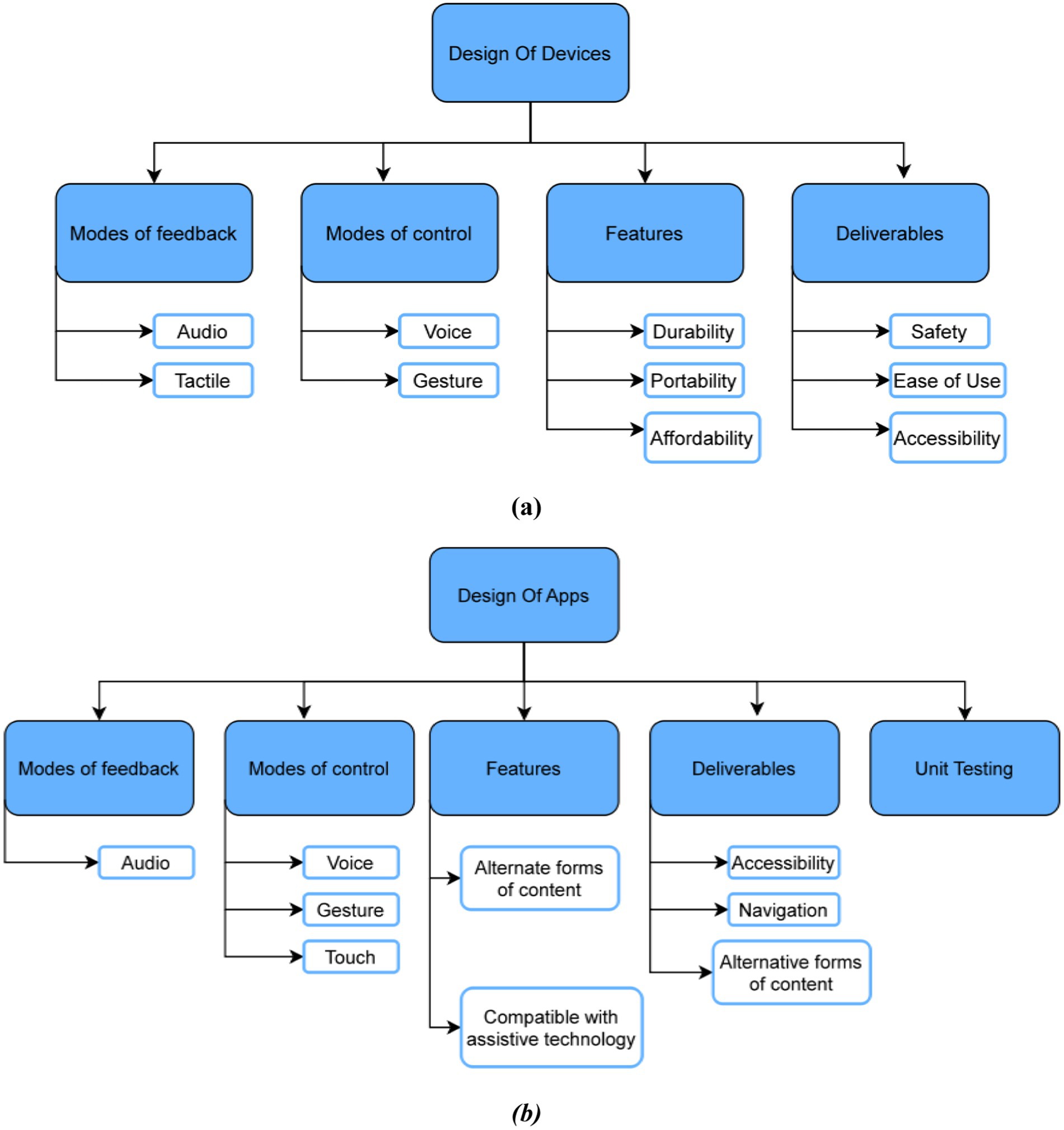
Figure 1. (a) Human based elements in the device design for visually impaired; (b) human based elements in the app design for visually impaired.
The application’s accessibility should be ensured by following accessibility standards, including high-contrast color schemes, larger font sizes, and adjustable text and image sizes. The navigation design should prioritize intuitiveness and ease of use with clearly labeled buttons and concise instructions. Ensuring compatibility with assistive technologies, such as screen readers and Braille displays, is essential for a comprehensive solution for users with visual impairments. Providing alternative forms of content, such as audio descriptions and audio cues, ensures content accessibility for CVI and PVI users. Figure 1b illustrates the human-based elements in app design for the visually impaired, detailing features (compatibility with assistive technology, smartphone portability), user testing (intense testing with visually impaired users), deliverables (navigation, accessibility), modes of control (gestures, voice, touch), and modes of feedback (audio, haptic via mobile vibrations) (11, 12).
An overview of NUI, Multi-sensory Interfaces and UX Design(NMUD) is also given, wherein discussions about definitions of NMUD for the visually impaired, Human Computer Interaction (HCI), usability, standards and regulations for devices, and methodologies of evaluation are provided (13). It further updates the readers on taxonomy, open challenges, and future research directions after reviewing previously published articles. In the Appendix, Table A1 illustrates the list of abbreviations and definitions. (Appendix Table A1).
1.1 Limitations of existing reviews
As observed from the introduction, the authors observed a limited number of review papers that comprehensively address the NMUD aspects of both applications and devices for visually impaired users in a single document. Table 1 presents the comparison with previous review articles based on apps and devices for the visually impaired. It shows that out of the (n = 8) review articles (excluding this study) pertaining to applications and devices for the visually impaired, only one article deals with both apps and devices; (n = 7) of this concentrate exclusively on apps, and a single article reviews the work done on specialized devices to aid the CVI and PVI. It can also be deduced that although the majority of the articles do address both the drawbacks and future directions, the discussion on future directions lacks clarity and depth (14–22).
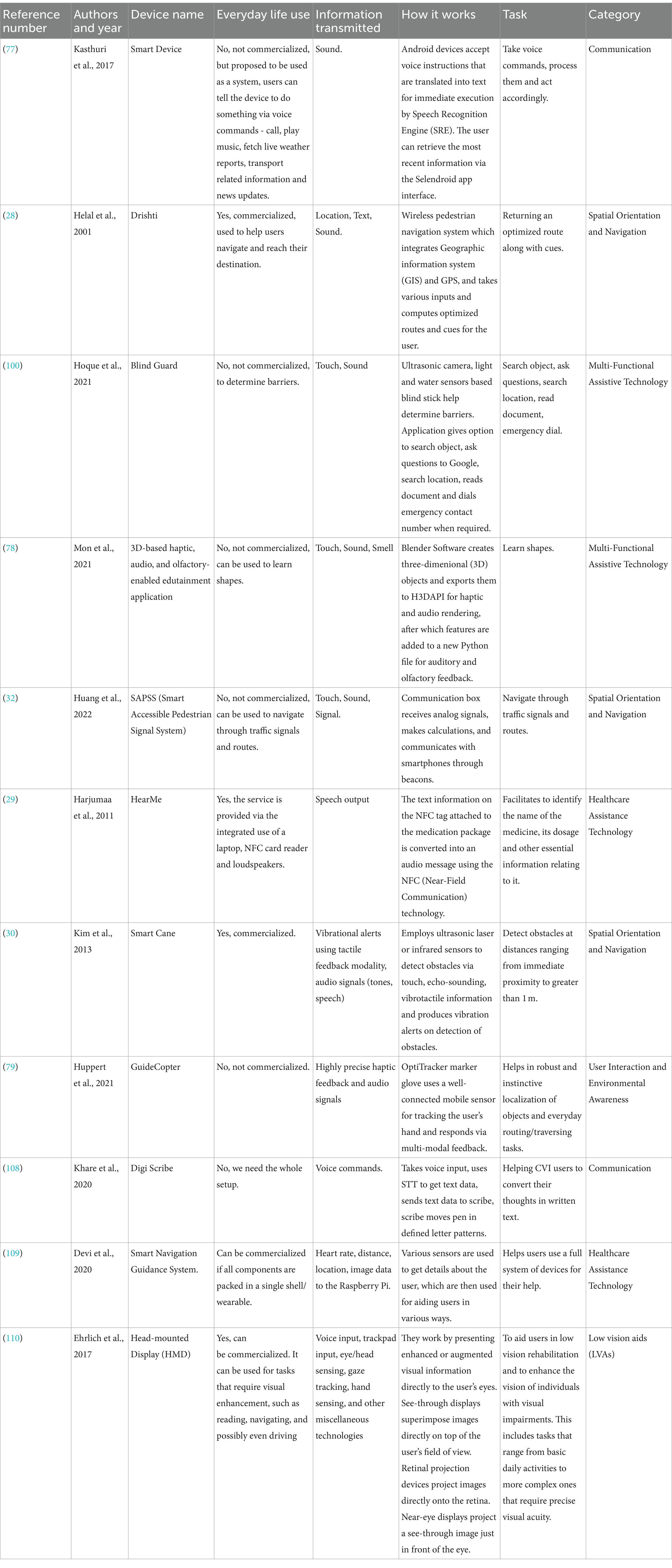
Table 1. Summary of various devices for visually impaired and their features.
1.2 Objectives of this review
• To identify applications and devices that cater to the diverse needs of visually impaired and partially visually impaired users from a NMUD point of view.
• Analyze how well NMUD principles are implemented in these existing solutions and their effectiveness in meeting the users’ needs.
• Identify key NMUD challenges in current solutions and suggest improvements for better usability and user satisfaction.
• Highlight areas for future research to advance NMUD for visually impaired users.
1.3 Contribution of this review
Our contribution can be summarized as follows:
• A comprehensive study on the NMUD of apps and devices for the people who suffer from partial or complete visual impairment, including various factors such as everyday life use, information transmitted, working, usability, and universal usability.
• The terms Human-Computer Interaction (HCI), User Interface (UI), UI Design, User Experience (UX), UX Design, Usability, and Universal Usability are defined and explained in relation to user interaction and design. Additionally, a collection of guidelines and standards that govern NMUD for devices and applications designed with the needs of visually impaired individuals in mind is also discussed.
• A comprehensive evaluation of the pros and cons of all apps and devices for the visually impaired, their respective NMUD analysis methods, and the concept of universal usability of user interface design is explored.
• The current open challenges and future research possibilities in the NMUD of apps and devices for the visually impaired useful for aspiring researchers, academia, and industry are presented in this review.
2 Methods
2.1 Comprehensive review methodology
To systematically choose the articles utilized in this comprehensive review, this study followed the Preferred Reporting Items for Systematic Reviews and Meta-Analyses (PRISMA) technique. This research started with articles (N = 3,125) from different article libraries. Out of these, non-duplicate articles (N = 2,096) were identified. The below-mentioned inclusion and exclusion criteria were applied, and articles (N = 1,859) were removed after the title and abstract screening. The inclusion and exclusion criteria were applied again on the remaining articles (N = 237) with full-text screening, and articles not retrieved (N = 52). Articles assessed for eligibility (N = 185) and (N = 79) were eliminated based on the scope of this work. Finally, as a result, (N = 106) articles were retrieved to be considered in the study.
These articles (N = 106) were analyzed completely by authors Lauryn Arora, Akansh Choudhary, Margi Bhatt and Kathiravan Srinivasan. For each of the articles, the initial step was to identify the future problems and open problems of the article. All the articles taken into consideration were after January 2001 and not before it. Future problems define how the publishers want to scale their products in the future with respect to better user interaction, functionalities, user experience, etc. Open problems define the current issues and/or limitations the publisher’s product is having with respect to user interface, functionalities, user experience. After screening the contents of the articles, the research was broken into different criteria as mentioned in the tables below.
2.1.1 Search strategy and literature sources
For this review, searching for relevant articles was conducted in various databases including Google Scholar, ACM Digital Library, IEEE Xplore, Springer, Taylor & Francis Online, PubMed (MEDLINE) and ScienceDirect from January 2001 to June 2023. Figure 2a illustrates the search string used in this review. A detailed representation of all the major databases considered is provided in the “PRISMA Flow Diagram” (Figure 2b) below. The string elements of this search string were searched on the Google Scholar search engine and the Vellore Institute of Technology ‘e-gateway’ search engine. The search string was formulated after gaining a clear understanding of the keywords that are most relevant to our review. Any article that did not follow the inclusion criteria was not considered. Both the inclusion and exclusion criteria are explained below.
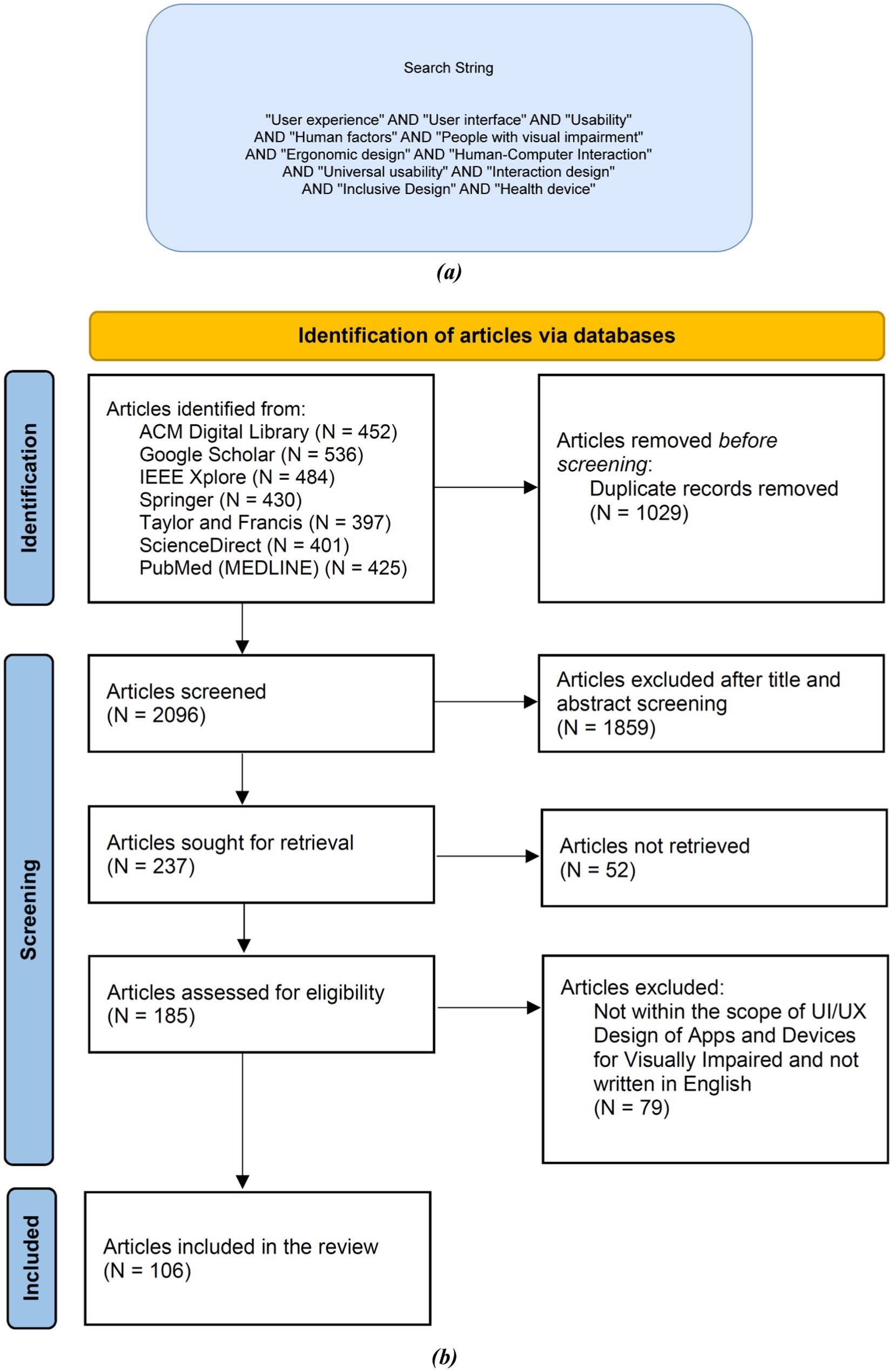
Figure 2. (a) Search string used in this review; (b) PRISMA flow diagram for the selection process of the research articles used in this review.
2.1.2 Inclusion criteria
The inclusion criteria for the articles in this review are as follows: First, the articles must be published after the year 2001. Second, they must be related to aiding the CVI and PVI individuals. Third, the articles can contain prototypes, concepts, or full projects/applications. Fourth, they must be written entirely in English. Fifth, they should be published in peer reviewed journals. Sixth, the articles should be either review articles or research articles. Finally, connection to the user interface (UI) and user experience (UX) design of apps or devices for visually impaired is required.
2.1.3 Exclusion criteria
The exclusion criteria for the articles in this review are as follows: First, articles should not be grey articles and published in archives will be excluded. Second, articles that have very little focus on aiding the CVI and PVI will also be eliminated. Third, articles that do not have a clear goal on the product will not be considered. Fourth, articles that are solely based on opinions rather than empirical evidence will be excluded. Fifth, conference abstracts will not be included in the review. Sixth, case reports or case series will also be eliminated from the review. Finally, letters to the editor will not be considered as part of this review.
2.1.4 Risk of bias
Selection of studies was made using PRISMA 2020 guidelines in this comprehensive review, which is an unbiased search strategy, along with detailed inclusion and exclusion criteria defined in sections 2.1.2 and 2.1.3, respectively. These were used to find full-length peer-reviewed articles. Efforts were made to minimize bias in selection based on the inclusion criteria, exclusion criteria, PRISMA 2020 guidelines, and search string. The focus has been on reporting studies with positive and statistically significant data from well-known journals mentioned in Figure 2b. PRISMA 2020 guidelines were employed to exclude grey and unpublished articles and literature, thus significantly reducing publication bias. Only peer-reviewed journals were considered to maintain the authenticity of the publications. There is a possibility of language bias, as only articles and studies written in English were considered for this review. This was due to English being the common language understood by all the authors and individuals involved in the review. The data presented in this review is based on existing peer-reviewed articles, with data reported directly from the referenced works. Best efforts have been made to obtain valid data from these peer-reviewed articles to curtail reporting bias as much as possible.
2.1.5 Safety concerns
After carefully observing and reading the details on the applications and devices mentioned in the review, the authors noticed several safety concerns evaluated based on how it will impact a visually impaired person’s daily routine and personal information:
A. Probability of data leaks when audio and sensory applications record user data and store it in their databases.
B. Probability of accidents of mishaps when the devices are being worn around the body and the person is still in learning stages.
C. There will be an increased level of fear and anxiety since now the person has to put all their trust regarding navigation and information on an electronic device which can function in unexpected ways due to technical glitches.
3 Results
To guarantee the inclusion of pertinent and excellent research, we conducted a thorough study selection process as the first stage of our analysis. Starting with nearly 3,125 results; 106 papers that satisfied the inclusion and exclusion criteria were found following a thorough screening procedure. These studies were assessed according to how well they adhered to NMUD principles and how applicable they were in real life to help the visually impaired population. Methodological rigor, publication year, peer-reviewed status and several other aspects were used to evaluate the research’ quality. This resulted in a collection of prototypes, concepts, and fully functional apps and devices/gadgets which provides a wide view of the current conditions and ongoing difficulties in the field of NMUD for the visually impaired population.
After implementing the comprehensive review methodology, inclusion criteria, exclusion criteria, and search strategy on all the literature sources, we constructed the “PRISMA Flow Diagram” (Figure 2b) which explains the filtration process applied to articles, research articles, and various different types of studies, using a defined search string and inclusion and exclusion criteria, to get to the final result set. “Article Count vs. Year” (Figure 3a) demonstrates the comparison between year and number of articles, which helps us understand how researched the topic was in different years. The graph trend shows that researchers are more inclined toward helping the visually impaired in recent years compared to before. These illustrations help us better understand statistics on the literature sources that were collected for this review. Figure 3b illustrates the trend of studies on NMUD of Apps and Devices for the Visually Impaired by country. It helps us understand how researched the topic is in different countries, and the graph trend shows that researchers are more inclined toward helping the visually impaired in India (N = 14) and the United States (N = 8).
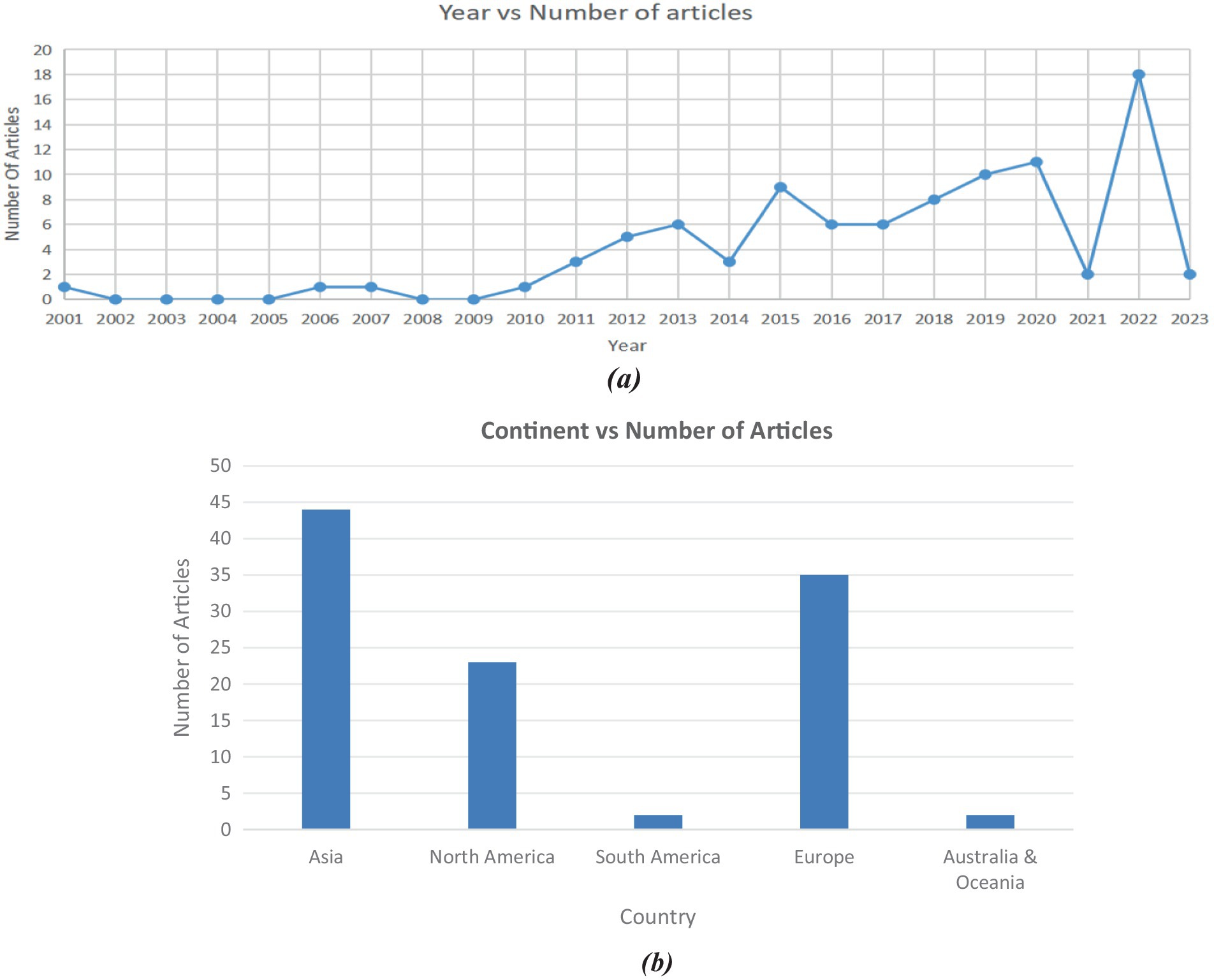
Figure 3. (a) Trend of studies on NMUD design of apps and devices for visually impaired over time; (b) trend of studies on NMUD design of apps and devices for visually impaired by continent.
3.1 Apps and devices for visual impairment
3.1.1 Mode of action for people with visual impairment
People with visual impairment may use a variety of strategies and technologies to navigate their surroundings and access information. Some common modes of action are:
• Auditory cues: Auditory cues have high potential for improving the quality of life of people who are visually impaired by increasing their mobility range and independence level (23).
• Tactile cues: Touch or tactile cues are used to give the individual with dual sensory impairments a way of understanding about activities, people and places through the use of touch and/or movement (24, 25). For instance, they might use their sense of touch to distinguish between various textures or surfaces, such as using a cane to detect changes in the ground surface.
• Assistive technologies: Braille displays, magnifying software, and screen readers, white canes are included (26). These tools facilitate easier interaction for people with vision impairment with others online and access to digital information.
• Mobility and orientation instruction: People with vision impairment receive instruction in safe and independent mobility. Orientation and mobility (O&M) instruction provides students who are deaf-blind with a set of foundational skills to use residual visual, auditory, and other sensory information to understand their environments (27).
Support from friends, family, and professionals is important for many people with vision impairment.
3.1.2 Devices for visually impaired people
Table 1 analyses research articles on devices for the visually challenged, highlighting important aspects such as daily use, information transmission, functionality, and tasks. It can be inferred that just 4 out of the 10 proposed solutions that we examine here have been commercialised and are in actual use by the target audience (28–31). In most devices, the information is communicated to the users via sound and, in some cases, via haptic feedback. In a few cases, the devices store and transmit geographical data, such as images of the surroundings and distance-related data. The solutions employ motion, sound, and obstacle detection sensors, and Global Positioning System (GPS) for their operations (28, 30, 32); technologies like Near-Field Communication (NFC) tags have also been seen to be applied. These devices can assist users with a wide range of tasks, from learning-related tasks to navigation and obstacle detection (33–36).
3.1.3 Apps for visually impaired people
Table 2 reviews research articles (n = 43) on apps for the visually challenged, focus on crucial aspects such as daily use, information transmission, functionality, and tasks. It can be inferred that (n = 24) apps out of the proposed solutions that we examine here have not been commercialised, whereas (n = 19) of these applications are in actual use by CVI and PVI users. In the majority of applications, the information is communicated to the users via text, sounds, audio, and, in some cases, Braille text and haptic feedback. In a few cases, the applications store and transmit geographical data, such as images of the surroundings and distance-related data. The solutions employ motion, sound, and obstacle detection sensors, cameras, and GPS for their operations (32, 36–71). Most of these applications aim to make a regular smartphone more accessible to CVI and PVI users and utilize the wide range of functionalities that make their lives simpler and assist them in learning, navigation, shopping, traveling, and entertainment-related tasks.
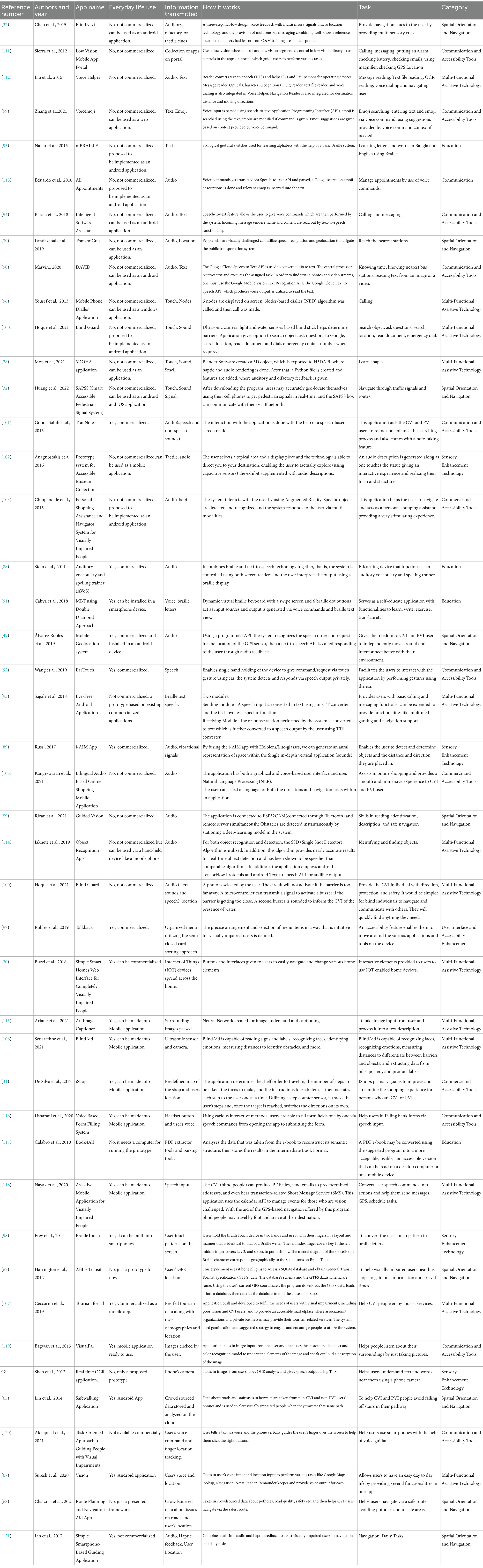
Table 2. Summary of various apps for visually impaired and their features.
3.2 NMUD design
3.2.1 Human–computer interaction
Human-computer interaction is a cross-disciplinary area of study, which majorly focuses on how to build, develop, and evaluate systems based on design thinking and implementation that emphasizes the communication between users and devices. The HCI system comprises four crucial elements: user, task, tool, and context (72). Since HCI takes into account human behavior, it is closely linked with fields like cognitive psychology, sociology, anthropology, and cognitive science. HCI’s close relationship with multiple disciplines of human behavior as well as computer science has made it an ever-evolving field, and its evolution has been influenced by the latest technological advancements (73–75).
3.2.2 User interface and user interface design
The most common are graphical user interfaces, interfaces controlled by voice, and interfaces based on hand gestures (76). However, User Interface design refers to a careful process of designing and developing these interfaces that lead to a seamless experience for the users. A very important element is that this design must be “invisible,” meaning while the user interacts with this system his attention must not be utilized in the design itself but rather support him in the quick, easy, and effective implementation of the required tasks (6, 76).
3.2.3 UX and user experience design
UX design requires the knowledge of programming concepts, cognitive science, interactive designing, graphic and visual designing. Table 3 presents the user comments on User Feedback - NMUD, Usability, and Universal Usability for apps used by Visually Impaired. It provides a comprehensive assessment of research publications (n = 43) pertaining to applications designed for those with visual impairments. The primary focus of this review is on key factors like usability, universal usability, and universal feedback. Moreover, a significant proportion of scholarly articles (n = 25) fail to address user feedback, while the remaining articles include user perspectives by highlighting the most beneficial elements, proposing novel functionalities, and suggesting modifications. Table 4 provides the definitions of User Feedback—NMUD, Usability, and Universal Usability for devices used by Visually Impaired. It reviews research articles (n = 10) on devices for the CVI and PVI individuals, focusing on crucial aspects such as usability, universal usability, and universal feedback. The majority of user comments on the usability have been that the application was found easy to use and successful in making their day-to-day tasks more convenient. It can be deduced that only five of the apps offer universal usability (29, 30, 77–79); and the rest do not, largely due to language constraints. Furthermore, three articles do not discuss user feedback at all, and the comments for the rest include the most useful features according to users, as well as recommendations on new features and suggested changes.
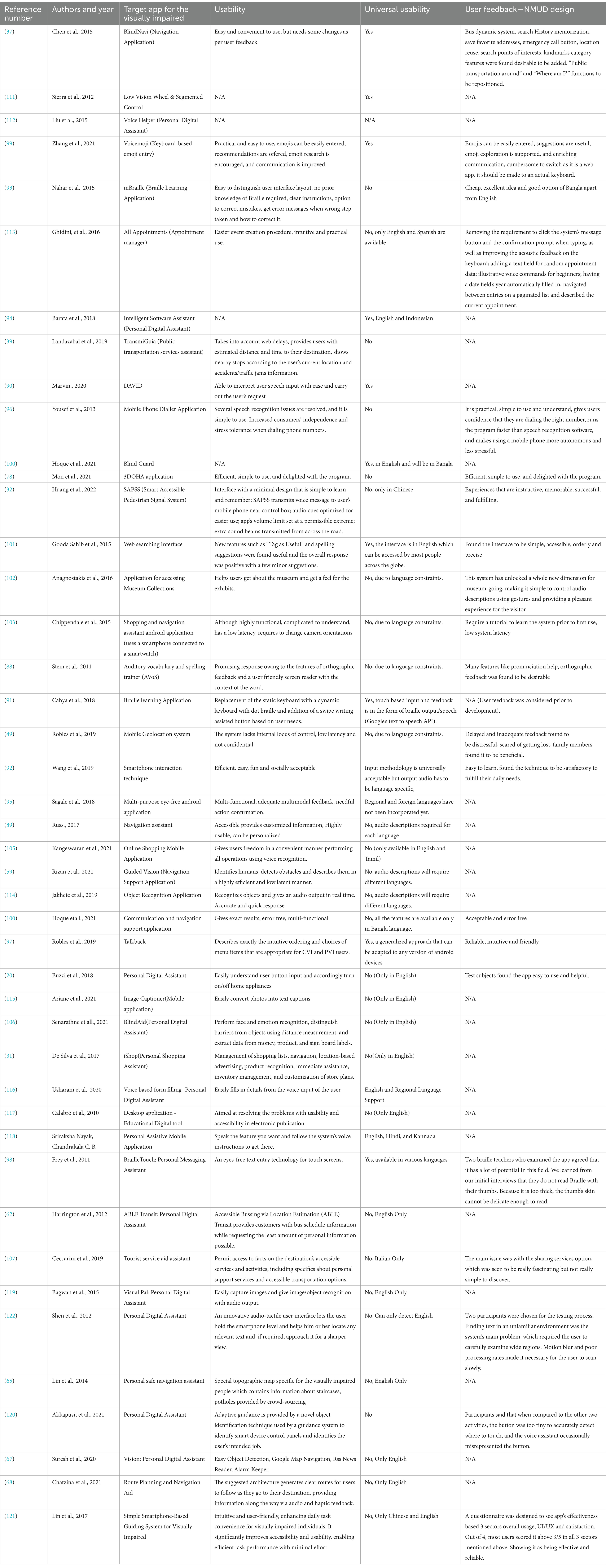
Table 3. Definitions of user feedback—NMUD, usability and universal usability for apps used by visually impaired.
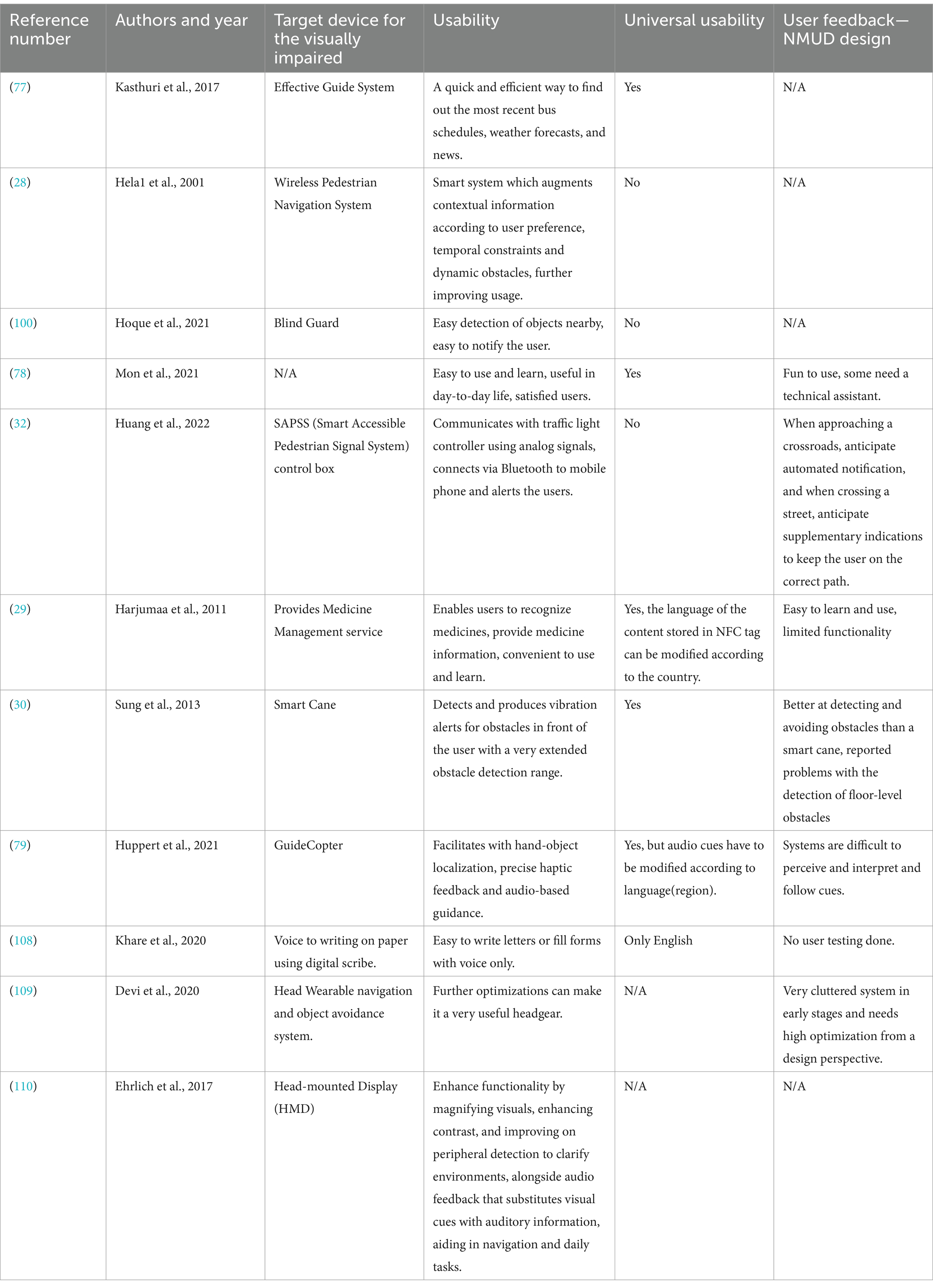
Table 4. Definitions of user feedback—NMUD design, usability and universal usability for devices used by visually impaired.
3.2.4 Usability
In order to ensure high usability, the utilization of standard practices and notations, uniformity throughout the application, and making the interface as well as the actions by the users similar to the real world so that these actions come to them in a very natural manner are some of the suggested approaches. According to Table 3, which reviews over (n = 40) articles on apps for the CVI and PVI individuals, the prevailing opinion among users regarding the usability of the program is that it is perceived as user-friendly and effective in enhancing the convenience of their daily duties. It may be inferred that a mere (n = 11) applications possess universal usability, whereas the remaining applications lack this attribute primarily owing to limitations related to language. As discussed in Table 4, where we make an assessment on devices (n = 10) for the CVI and PVI, the majority of user comments on the usability have been that the application was found easy to use and successful in making their day-to-day tasks more convenient. It can be deduced that only five of the apps offer universal usability, and the rest do not, largely due to language constraints.
3.2.5 Inclusive design/universal design/universal usability
The term “universal design” was devised at North Carolina State University in the context of architecture by Ronald L. Mace in the year 1985 (80). In order to implement universal design in a device or an application, both the macro view of the application as well as the micro view has to be taken into account (81). At the North Carolina State University’s Center of Universal Design, the experts including architects, product designers, engineers and researchers came up with seven principles of Universal design, namely, equitable use, flexibility in use, simple and intuitive, perceptible information, tolerance for error, low physical effort and size and space for approach and use (82–86).
3.2.6 Standards and regulations for devices
A large number of standards exist for apps and devices, serving as rules that guarantee these items comply with specified requirements and are compatible with other products, for example, assistive applications and devices. The ISO 9999: 2022 standard sets forth a system for categorizing and labeling assistive products intended for individuals with disabilities (86). Regulations, on the other hand, refer to the legal requirements that vary according to different apps and devices and also by country. These administer the development, distribution, and the use of apps and devices in the user environment (87).
3.2.7 Methodologies of evaluation—NMUD analysis of devices for visually impaired
Table 5 presents the methodology of NMUD analysis of devices for the visually impaired; it gives a comprehensive overview of scholarly publications (n = 10) that examine devices for CVI and PVI individuals. The primary objective of these articles is to evaluate essential features, including analysis methodologies for user interface (UI) and user experience (UX), advantages and disadvantages of the devices, and the specific devices targeted in the research. For NMUD analysis, testing tools like Selendroid (77), qualitative field trials (29), pre and post-trial interviews (29, 30), user evaluation testing (30), and ANOVA analysis (30) are all commonly used methods. According to users, the main benefits of any device are its affordability, customizability, scalability, compatibility with current solutions for the visually impaired (CVI and PVI), and the fact that wearable or easily transportable devices are small and portable. The key negatives cited in relation to any given application encompass significant financial expenses, challenges in comprehending its usage, the absence of power backup, and limited applicability across various scenarios. It can be observed that using voice recognition, location and haptics are the most common methods in which devices employ natural user interface in their overall architecture.
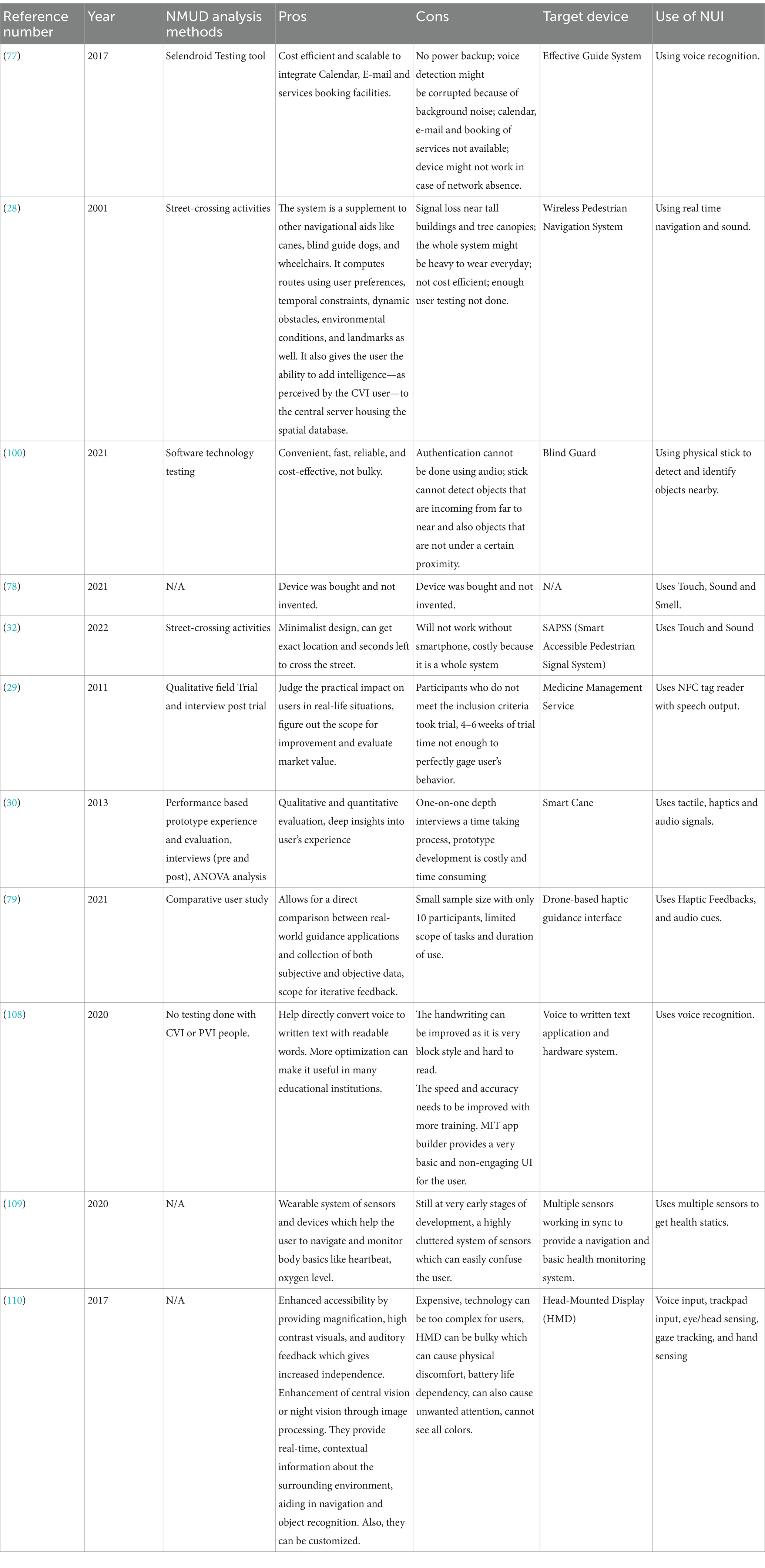
Table 5. Methodology of NMUD analysis of devices for visually impaired.
3.2.8 Methodologies of evaluation—NMUD analysis of apps for visually impaired
Table 6 presents the methodology of NMUD analysis of apps for the visually impaired. It reviews research articles (n = 44) on applications for the CVI and PVI, focusing on crucial aspects such as NMUD analysis methods, pros and cons, target devices and Use of NUI. Some of the widely employed approaches for NMUD analysis are questionnaires (78, 88, 89), usability studies (37), formative interviews (90–92), direct interviews (31, 91, 93–95), workshop interviews (14), and user evaluation testing (20, 96–98) and other methods (32, 49, 99–107). The major comments regarding the pros of any app, according to the users, are low cost, personalization, adaptability, availability in the language of their choice, and the app being platform-independent. The identified primary drawbacks associated with any application were its reliance on certain platforms, lack of personalization, significant latency, high cost, and the absence of user input in the final testing. It can be observed that touch, tactile, haptics and location are the most common natural user interfaces that were used in most of applications. These natural user interfaces help the CVI and PVI population interact more easily with the smartphone applications.

Table 6. Methodology of NMUD analysis of apps for visually impaired.
4 Open challenges
One of the significant challenges faced in designing devices for visually impaired individuals is integrating new technologies with existing practices, addressing battery life limitations and slow real-time processing resulting in slower reaction times. Safety concerns are also a crucial factor that designers must consider when developing these devices. However, the functionality of these devices is limited, and there is ample scope for improvement. Additionally, the user interface and user experience design of these devices present their own set of challenges, including high cognitive overload, extensive learning requirements, non-catchy interfaces, and limited functionality. Addressing these challenges is essential for ensuring that visually impaired individuals can use these devices efficiently and safely, ultimately leading to a higher quality of life. Furthermore, there are several open challenges in designing apps and devices for visually impaired individuals, including compatibility with assistive technologies, customization options, feedback mechanisms, and user support availability. Overcoming these challenges is crucial for providing visually impaired individuals with greater independence and a higher quality of life, and continued research and development in this area are necessary.
4.1 Open challenges—NMUD design of devices for visually impaired
Figure 4a illustrates the open challenges concerned with the NMUD of devices for the visually impaired, such as frequent charging and battery issues, it is hard to achieve high processing speed which can provide output in very little time after processing all the input from the environment. There are a lot of safety concerns with these devices as the user is performing all his/her major tasks based on the inputs provided by the device, and any error in output, navigation, or response can cause accidents. There is also limited functionality that is possible with respect to size constraint. Additionally, we need to provide constant customer and hands-on support for the device. Figure 4b portrays the open challenges related to the NMUD of Apps for the Visually Impaired.
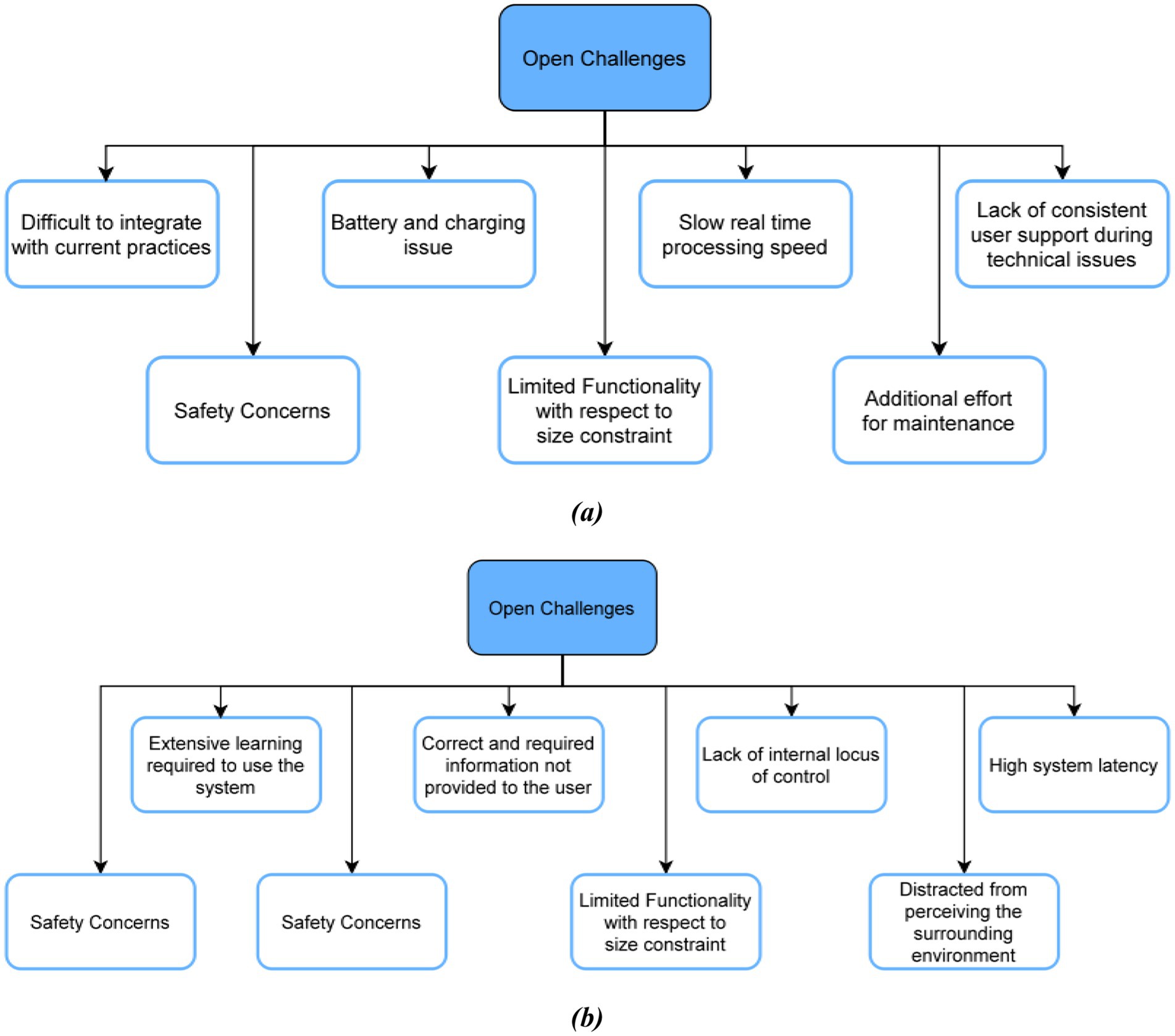
Figure 4. (a) Open challenges—NMUD of devices for visually impaired; (b) open challenges—NMUD of apps for visually impaired.
4.2 Open challenges—NMUD of apps for visually impaired
The open challenges associated with the NMUD of apps for the visually impaired are shown in Figure 4b. The device may not provide accurate results every time due to several distractions in the environment and technical glitches. The user needs to go through a long learning curve for most applications to learn all the gestures or voice commands to operate the application. Many times, there is also a lack of internal locus of control.
5 Discussion
5.1 Synthesis, interpretations and comparisons of results
This comprehensive review sheds light on several critical findings concerning the commercialization and usability of devices and applications designed for individuals with Complete Visual Impairment (CVI) and Partial Visual Impairment (PVI). As indicated in Table 1, there is a wide array of innovative devices developed for visually impaired users. Despite their innovation, a significant gap in commercialization persists. Many devices are geared toward healthcare, navigation, and communication, yet they often overlook essential areas such as social inclusion, employment opportunities, financial inclusion, and independent living. This gap underscores the necessity for more comprehensive solutions that address the diverse needs of visually impaired individuals.
Moving to applications, Table 2 elaborates on the usability and functionality of various apps designed for the visually impaired. A striking observation is that out of 43 reviewed applications, 24 have not yet been commercialized, which suggests a gap between development and market availability. The apps are primarily designed to provide auditory, tactile, or Braille feedback, enhancing navigation, communication, and daily task management for visually impaired users. This underscores the potential of such applications to significantly improve the quality of life for these individuals by making smartphones more accessible and versatile in performing a wide array of tasks.
Tables 3, 4, which examine apps and devices respectively, reveal that a notable proportion of articles (26 out of 53) lack thorough discussions on user feedback. This is a significant oversight because user feedback is crucial for evaluating the effectiveness of these solutions. Additionally, the usability of many proposed applications and devices is limited by language constraints, restricting their universal applicability. This highlights the importance of incorporating language inclusivity in the design and development of assistive technologies.
Tables 5, 6 present a variety of Natural User Interfaces (NUI) that are essential to the advancement of assistive technologies because they provide users with simple and convenient interactions. Gesture recognition is one of them, enabling users to interact with devices using their own natural movements. Because it can be tailored to identify motions that are appropriate for the user’s skills, this type of interaction is very helpful for people who have physical limitations. While gesture recognition offers a high level of user involvement, its accuracy and responsiveness might vary depending on the technology and environment. As such, gesture recognition requires rigorous calibration and user training to attain maximum effectiveness.
Another common NUI type included in these Tables 5, 6 is voice command interfaces. It is especially helpful for visually impaired people since they allow spoken language control over equipment and information access. Voice commands are an intuitive interface that requires little physical involvement, making it usable by a variety of users. However, elements like background noise, language obstacles, and the quality of speech recognition can affect how successful voice command systems are. Voice commands are emphasized as an essential NUI element that improves usability by offering a hands-free and eyes-free interaction option, despite these difficulties.
Because they are recognizable and simple to use, touch-based interactions which are typically seen in smartphones and tablets are also widely employed in assistive devices. These interfaces provide a clear, generally accessible design and let users interact with gadgets with easy taps, swipes, and pinches. According to the papers cited in Tables 5, 6, touch-based NUIs are preferred due to their ease of use and the abundance of touch-enabled devices on the market. But obstacles including sensitivity problems, screen accessibility, and the requirement for visual input might reduce their usefulness, especially for people with certain impairments.
Similarly, Table 6 shows that 32 out of 44 articles provide insights into design and user experience analysis. The articles employ various NMUD analysis methods, including questionnaires, usability studies, formative interviews, direct interviews, and user evaluation testing. The primary advantages highlighted include low cost, personalization, adaptability, and availability in multiple languages. However, drawbacks such as reliance on specific platforms, lack of personalization, significant latency, high costs, and absence of user input in final testing are noted. These detailed discussions emphasize the necessity of thorough NMUD analysis in creating effective assistive applications.
When compared to other review papers, this study distinguishes itself by offering a detailed analysis of various applications and devices for the visually impaired from a NMUD perspective. It addresses multiple open problems and future challenges, relating them to each application and device. Other review papers often lack comprehensive statistics, such as those shown in Figures 2b, 3a,b, which illustrate the PRISMA flow diagram for article selection, the distribution of articles by year, and the geographic distribution of research, respectively. The analysis of Tables 1–6 provides a nuanced understanding of the current state of NMUD for applications and devices aimed at visually impaired users. The study meticulously reviews the functionality, usability, and user feedback associated with these technologies, offering a detailed and critical assessment that is often missing in other review papers.
5.2 Current review limitations
We have identified some key limitations of the review study such as (i) NMUD preferences and trends are ever evolving and change every couple of years, so sometimes it is not feasible to do an end-to-end comparison between articles of different years of publication. (ii) Language Barrier played a major role in the filtering of articles, since we have limited the scope of only English articles, it is very well possible that this article missed worthy articles just because they were not in English. (iii) The Generalization Challenge was present throughout the review as the needs and preferences of the visually impaired population differ with different age groups, sex, and other demographic criteria, this combined with different levels of impairment increases the complexity. (iv) All the reviews were conducted fully on existing work of other authors, so it assumes all of their assumptions and biases as a requirement for the literary work. No professional or personal opinion was included to evaluate to moral or ethical value of the existing reviews (Table 7).
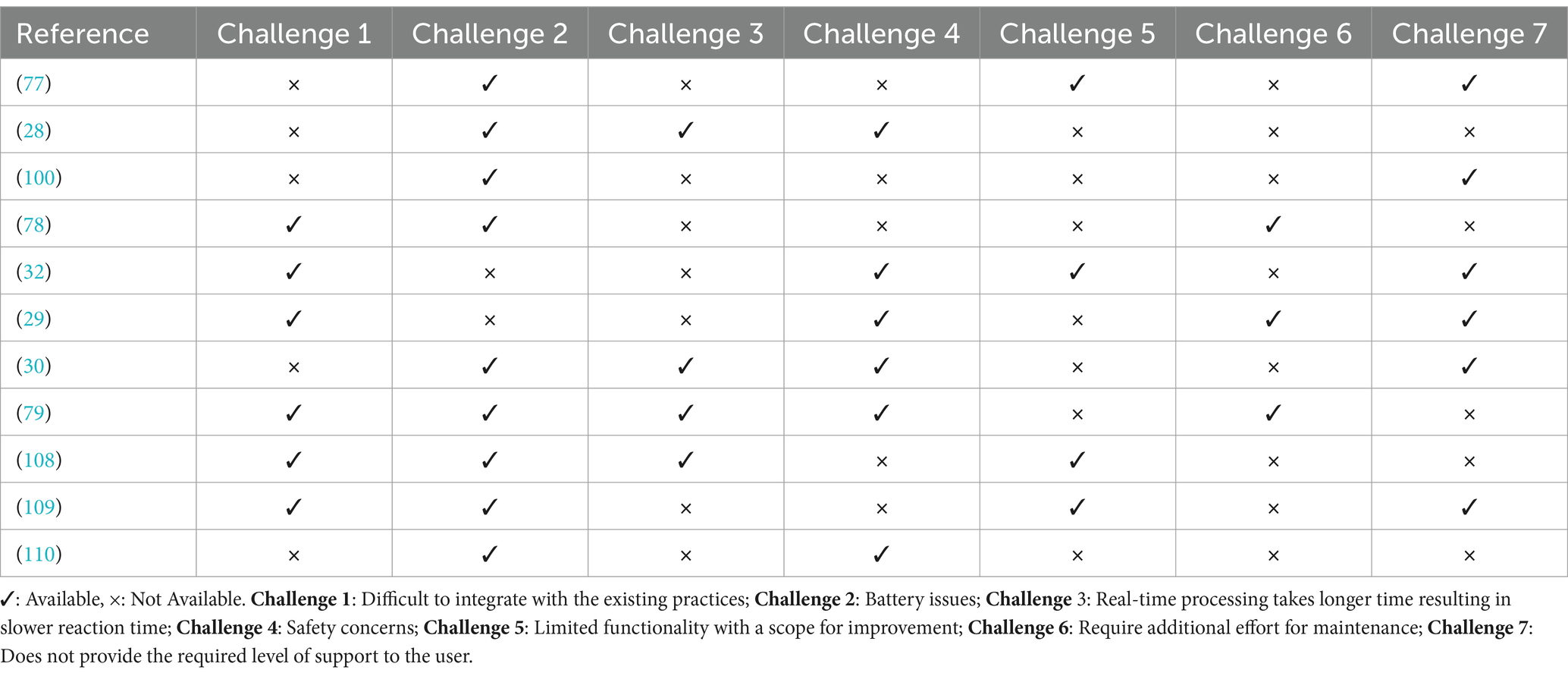
Table 7. Open challenges—NMUD of devices for visually impaired.
5.3 Future research directions
From the detailed analysis of all the articles and comprehensive review of recent trends, there are many fields and directions in which exploration can be done by researchers as well as developers of apps and devices. Figure 5 represents the future research directions. Since this study is targeted toward visually impaired users, apart from voice feedback, non-speech sounds should be included more to improve receptivity and provide more information when interacting with screen-readers. The audio instructions must be minimal, short, and precise to ensure they do not cognitively overburden the user. Our review has shown that if CVI (Completely Visually Impaired - Blind people) and Partially Visually Impaired (CVI and PVI) users are included in all stages of development of the system and not just at the time of final user testing, they can provide very crucial input to the process ensuring high efficiency and usability. There must also be a facility for seamless integration with supporting Application Programming Interfaces (APIs) and other assistive technologies for web and mobile applications (Table 8).
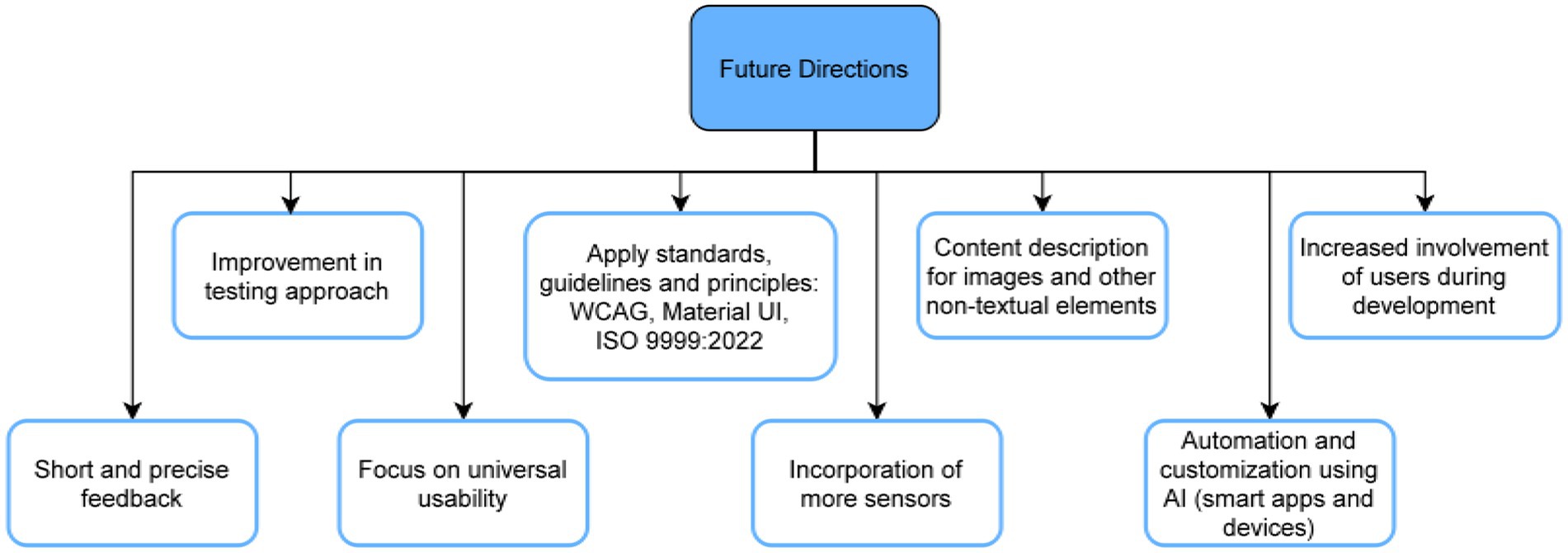
Figure 5. Future research directions.

Table 8. Open challenges—NMUD of apps for visually impaired.
Web application developers must familiarize themselves with the Web Content Accessibility Guidelines (WCAG) that serve the specific purpose of making the web accessible to people with disabilities. The practical principles of e-accessibility must also be applied while developing websites, programs, etc. Material UI, a well-known library based on React, which follows Google’s Material Design principles, is highly beneficial for developers. It provides pre-built UI components that simplify the development process and result in a consistent visual style throughout the application, saving time and effort. Future efforts will focus on creating features and components that make editing tasks easier and facilitate web-based collaboration. A web-based application for document conversion, adaptation, collaboration, and sharing will be considered alongside Microsoft Word and OpenOffice.org Writer add-ons to help accomplish this goal.
There needs to be further work to utilize haptic feedback in a much wider range of situations and easy detection of complex and emergent devices, especially for smart cane devices. The development in the previously mentioned arena would also improve. GuideCopter, a tethered haptic drone interface, has the potential to enhance the user’s immersion in virtual and augmented reality. To give CVI and PVI users the greatest extent feasible an engaging experience similar to that of people who are not visually impaired users, colored text and other visual cues like bold, italic, flickering, or highlighted text can be translated into content description. EarTouch and similar devices can be given artificial intelligence so that they can automatically regulate the volume and switch from ear speakers to loudspeakers based on the user’s position in relation to the screen and the surrounding environment.
In future research studies, a wider range of participants with diverse factors that include chronological age, cultural background, touch-screen experience, and mobile device fluency should be considered, and their input should be incorporated into the development process. There should also be more focus on personalization and development of tools that allow for easy end-user customization to make the end products well-suited to the needs of each user. The architecture of these apps must be broadened to encompass multi-language functionality, including local and regional languages, to reach a larger audience.
It is crucial to acknowledge the significance of the social surroundings in the adoption of technology in future research. Potential future projects could concentrate on adding captions and audio descriptions to videos to provide ongoing, real-time information to individuals who are visually impaired (10). To enhance the navigation systems, incorporating a vast array of sensors can aid in object detection and health monitoring.
For the applications, there must be an attempt to make them standalone to a high degree to reduce the reliance on the user’s phone hardware. The applications should also be available on both Android and iOS. Creating something as simple as a help button will guide the users in case of an emergency or if they get lost within the application and help improve the internal locus of control. To have a high-performing and reliable database for mobile applications, it is advisable to utilize appropriate database technology like SQLite or Realm, enhance query optimization, reduce data transfers, introduce caching, keep track of performance, regularly maintain the database’s compactness, and, if necessary, use a remote database for extensive data or multiple user scenarios. The “view. setContentDescription,” which is an Android-specific function, must be used liberally to optimize the user experience, since without the content description set, the screen reader will just read the text.
It is recommended that the apps and devices undergo testing by a substantial group of visually impaired individuals to generate a larger dataset. A comprehensive examination should be conducted to investigate the testing scenario in depth. This will generate valuable information that can be utilized to enhance the testing process in a more analytical manner. Extension of the testing period will enable a deeper insight into the user population and their medication usage habits (HearMe).
5.4 Key takeaways
In this work, we first emphasize how important it is for users who are visually impaired to have access to audible and tactile feedback in the form of elevated buttons, vibrations, and aural signals. In our second section, we address the enduring issues of pricing and accessibility, pointing out that high costs, restricted functionality, and system latency are the main obstacles to universal access. Moreover, we support a user-centered design methodology that puts the unique requirements and preferences of visually impaired users first and guarantees a smooth interaction with assistive technology and online content accessibility rules. Furthermore, the significance of integrating with pre-existing technologies is underscored, as it capitalizes on recognizable interfaces to mitigate the learning curve and augment acceptance among this population. Together, these observations show the complex opportunities and challenges involved in creating NMUD that is inclusive and empowering for people with visual impairments.
6 Conclusion
In this review article, the taxonomy of the key design elements that have been considered in the design of apps and devices for visually impaired individuals is presented. Various review articles have been compared to analyze the depth of exploration that each article has undertaken in this domain. Everyday life usage, transmission of information, and the working of each application and device have been discussed in our collected set of articles. A brief review of various terminologies like HCI, UI, UI Design, UX & UX Design, Usability, and Universal Usability has been provided. Standard guidelines for making applications and devices for visually impaired users were also discussed. Apart from usability, universal usability, and user feedback, the benefits and detriments of proposed/implemented ideas were examined for respective articles. Developers and designers can utilize the discussed open problems by using our future directions. Frequently observed open problems were battery issues, lack of internal locus of control, high system latency, and limited functionalities. Developers and designers willing to develop novel approaches to cater to the needs of CVI and PVI users can utilize this review as a roadmap/guide as it lays out precisely the working, usability, and user feedback of a vast array of apps and devices and come up with solutions that can be based on the listed methods. Researchers in the field of NMUD will find this as a comprehensive guide to the areas in which they need to work in the future to address the mentioned open challenges. Despite the extensive scope of the NMUD field, there are several unresolved issues, indicating ample room for advancement in this area.
Author contributions
LA: Visualization, Data curation, Formal analysis, Investigation, Software, Writing – original draft, Writing – review & editing. AC: Conceptualization, Data curation, Formal analysis, Investigation, Software, Visualization, Writing – original draft, Writing – review & editing. MB: Conceptualization, Data curation, Formal analysis, Investigation, Software, Visualization, Writing – original draft, Writing – review & editing. JK: Funding acquisition, Project administration, Validation, Writing – review & editing. KS: Methodology, Software, Supervision, Visualization, Writing – original draft, Writing – review & editing.
Funding
The author(s) declare financial support was received for the research, authorship, and/or publication of this article. The APC was supported by Vellore Institute of Technology, Vellore, India.
Conflict of interest
The authors declare that the research was conducted in the absence of any commercial or financial relationships that could be construed as a potential conflict of interest.
The author(s) declared that they were an editorial board member of Frontiers, at the time of submission. This had no impact on the peer review process and the final decision.
Publisher’s note
All claims expressed in this article are solely those of the authors and do not necessarily represent those of their affiliated organizations, or those of the publisher, the editors and the reviewers. Any product that may be evaluated in this article, or claim that may be made by its manufacturer, is not guaranteed or endorsed by the publisher.
References
1. Wikipedia contributors. (2024). User interface design. Wikipedia. Available at: https://en.wikipedia.org/wiki/User_interface_design (Accessed June 25, 2023).
2. ISO 9241-210. (2019). ISO. Available at: https://www.iso.org/standard/77520.html (Accessed February 16, 2023).
3. Natural user interface. (2024). Wikipedia. Available at: https://en.wikipedia.org/wiki/Natural_user_interface (Accessed February 16, 2023).
4. Graham, T, and Gonçalves, A. (2017). Stop designing for only 85% of users: Nailing accessibility in design — Smashing magazine. Smashing Magazine. Available at: https://www.smashingmagazine.com/2017/10/nailing-accessibility-design/ (Accessed March 15, 2023).
5. World Health Organization: WHO. (2023). Blindness and vision impairment. Available at: https://www.who.int/news-room/fact-sheets/detail/blindness-and-visual-impairment (Accessed August 16, 2023).
6. Mehedi, M. (2023). The ultimate guide of accessibility in UI/UX design. Medium. Available at: https://ui-ux-research.medium.com/the-ultimate-guide-of-accessibility-in-ui-ux-design-d625777a9e3 (Accessed March 16, 2023).
7. Nahar, L., Jaafar, A., Ahamed, E., and Kaish, A. B. M. A. How to make websites accessible for the visually impaired. (2023). Available at: https://fuzzymath.com/blog/improve-accessibility-for-visually-impaired-users/ (Accessed on March 24, 2024).
8. Gruver, J. (2024). Embracing accessibility and inclusivity in UX/UI design. Medium. Available at: https://medium.com/@jgruver/embracing-accessibility-and-inclusivity-in-ux-ui-design-a813957d16d8 (Accessed January 14, 2024).
9. Craig, A. (2019). Designing and developing your android apps for blind users (part 1). Medium. Available at: https://medium.com/@AlastairCraig86/designingand-developing-your-android-apps-for-blind-users-part-1-cc07f7ffb5df (Accessed March 20, 2023).
10. Craig, A. How to design accessibility app for visually impaired? (2019). Available at: https://appinventiv.com/blog/design-accessibility-app-for-visuallyimpaired/ (Accessed February 2, 2024).
11. Tips on designing inclusively for visual disabilities. (2021). Tips on designing inclusively for visual disabilities. Available at: https://uxdesign.cc/tips-on-designinginclusively-for-visual-disabilities-d42f17cc0dcd (Accessed March 16, 2023).
12. Web accessibility for visual impairments. (2018). Web accessibility for visualimpairments. Medium. Available at: https://uxdesign.cc/web-accessibility-for-visual-impairmenta8ee4bb3aef8 (Accessed March 22, 2023).
13. Pohjolainen, S. (2020). Usability and user experience evaluation model for investigating coordinated assistive technologies with blind and visually impaired (Doctoral dissertation, Master’s thesis, University of Oulu).
14. Csapó, Á, Wersényi, G, Nagy, H, and Stockman, T. A survey of assistive technologies and applications for blind users on mobile platforms: a review and foundation for research. J Multimodal User Interfaces. (2015) 9:275–86. doi: 10.1007/s12193-015-0182-7
15. al-Razgan, M, Almoaiqel, S, Alrajhi, N, Alhumegani, A, Alshehri, A, Alnefaie, B, et al. A systematic literature review on the usability of mobile applications for visually impaired users. PeerJ Computer Sci. (2021) 7:e771. doi: 10.7717/PEERJ-CS.771
16. Khan, A, and Khusro, S. An insight into smartphone-based assistive solutions for visually impaired and blind people: issues, challenges and opportunities. Univ Access Inf Soc. (2021) 20:265–98. doi: 10.1007/s10209-020-00733-8
17. Torres-Carazo, M. I., Rodriguez-Fortiz, M. J., and Hurtado, M. V. (2016). “Analysis and review of apps and serious games on mobile devices intended for people with visual impairment.” 2016 IEEE international conference on serious games and applications for health (SeGAH), serious games and applications for health (SeGAH), 1–8.
18. Kim, W. J., Kim, I. K., Jeon, M. K., and Kim, J. (2016). “UX design guideline for health Mobile application to improve accessibility for the visually impaired.” 2016 international conference on platform technology and service (PlatCon), platform technology and service (PlatCon), 1–5.
20. Buzzi, Marina, Leporini, Barbara, and Meattini, Clara. (2018). Simple smart HomesWeb interfaces for blind people. 223–230.
21. Solano, V, Sánchez, C, Collazos, C, Bolaños, M, and Farinazzo, V. Gamified model to support shopping in closed spaces aimed at blind people: a systematic literature review In: (P. H. Ruiz, V. Agredo-Delgado, and A. L. S. Kawamoto) (eds). Communications in computer and information science, Springer Nature Switzerland AG. (2021). 98–109.
22. Alajarmeh, N. Non-visual access to mobile devices: a survey of touchscreen accessibility for users who are visually impaired. Displays. (2021) 70:102081. doi: 10.1016/j.displa.2021.102081
23. Bilal Salih, HE, Takeda, K, Kobayashi, H, Kakizawa, T, Kawamoto, M, and Zempo, K. Use of auditory cues and other strategies as sources of spatial information for people with visual impairment when navigating unfamiliar environments. Int J Environ Res Public Health. (2022) 19:3151. doi: 10.3390/ijerph19063151
24. Huang, H. Blind users’ expectations of touch interfaces: factors affecting interface accessibility of touchscreen-based smartphones for people with moderate visual impairment. Univ Access Inf Soc. (2018) 17:291–304. doi: 10.1007/s10209-017-0550-z
25. Tips for home or school. Using cues to enhance receptive communication | Nevada dual sensory impairment project. University of Nevada, Reno. (2020). Available at: https://www.unr.edu/ndsip/english/resources/tips/using-cues-to-enhance-receptive-communication#:~:text=Touch%20or%20tactile%20cues%20are,of%20touch%20and%2For%20movement (Accessed March 22, 2023).
26. Assistive Technology. Disability Support. Enabling Guide. SGEnable_SF11. Available at: https://www.enablingguide.sg/im-looking-for-disability-support/assistive-technology/at-visual-impairment#:~:text=With%20Visual%20Impairment-,Braille%20devices,and%20produce%20content%20in%20Braille (Accessed March 25, 2023).
27. National Center on Deafblindness. The importance of orientation and mobility skills for students who are Deaf-Blind. (2004). Available at: https://www.nationaldb.org/info-center/orientation-and-mobility-factsheet/#:~:text=Orientation%20and%20mobility%20(O%26M)%20instruction,information%20to%20understand%20their%20environments (Accessed March 25, 2023).
28. Helal, A., Moore, S. E., and Ramachandran, B. (2001). “Drishti: an integrated navigation system for visually impaired and disabled.” Proceedings fifth international symposium on wearable computers, wearable computers, 2001. Proceedings. Fifth International Symposium on, Wearable Computers, 149–156.
29. Harjumaa, M., Isomursu, M., Muuraiskangas, S., and Konttila, A. (2011). “HearMe: a touch-to-speech UI for medicine identification.” 2011 5th international conference on pervasive computing Technologies for Healthcare (PervasiveHealth) and workshops, pervasive computing Technologies for Healthcare (PervasiveHealth), 85–92.
30. Kim, SY, and Cho, K. Usability and design guidelines of smart canes for users with visual impairments. Int J Des. (2013) 7:99–110.
31. De Silva, D. I., Nashry, M. R. A., Varathalingam, S., Murugathas, R., and Suriyawansa, T. K. (2017). iShop — Shopping application for visually challenged. IEEE, 2017 9th International Conference on Knowledge and Smart Technology (KST), Chonburi, Thailand. 232–237.
32. Huang, C-Y, Wu, C-K, and Liu, P-Y. Assistive technology in smart cities: a case of street crossing for the visually-impaired. Technol Soc. (2022) 68:1–7. doi: 10.1016/j.techsoc.2021.101805
33. Jafri, R, and Khan, MM. User-centered design of a depth data based obstacle detection and avoidance system for the visually impaired. HCIS. (2018) 8:1–30. doi: 10.1186/s13673-018-0134-9
34. Devkar, S., Lobo, S., and Doke, P. (2015). “A grounded theory approach for designing communication and collaboration system for visually impaired chess players.” In Universal access in human-computer interaction. Access to Today’s technologies: 9th international conference, UAHCI 2015, held as part of HCI international 2015, Los Angeles, CA, USA, august 2–7, 2015, proceedings, part I 9 (pp. 415–425). Springer International Publishing.
35. Chaudary, B, Pohjolainen, S, Aziz, S, Arhippainen, L, and Pulli, P. Teleguidance-based remote navigation assistance for visually impaired and blind people—usability and user experience. Virtual Reality. (2021) 27:1–18. doi: 10.1007/s10055-021-00536-z
36. Aiordachioae, A., Schipor, O.-A., and Vatavu, R.-D. (2020). “An inventory of voice input commands for users with visual impairments and assistive smart glasses applications.” 2020 international conference on development and application systems (DAS), development and application systems (DAS), 146–150.
37. Chen, H.-E., Chen, C.-H., Lin, Y.-Y., and Wang, I.-F. (2015). “BlindNavi: a navigation app for the visually impaired smartphone user.” Conference on Human Factors in Computing Systems - Proceedings, 18, 19–24.
38. Gordon, K. (2024). 5 visual treatments that improve accessibility. Nielsen Norman Group. Available at: https://www.nngroup.com/articles/visual-treatments-accessibility/ (Accessed January 2, 2024).
39. Landazabal, N. P., Andres Mendoza Rivera, O., Martınez, M.H, and Uchida, B. T. (2019). “Design and implementation of a mobile app for public transportation services of persons with visual impairment (TransmiGuia).” 2019 22nd symposium on image, signal processing and artificial vision, STSIVA 2019 - conference proceedings.
40. Albraheem, L., Almotiry, H., Abahussain, H., AlHammad, L., and Alshehri, M. (2014). “Toward designing efficient application to identify objects for visually impaired.” In 2014 IEEE international conference on computer and information technology (pp. 345–350). IEEE
41. Al-Busaidi, A., Kumar, P., Jayakumari, C., and Kurian, P. (2017). “User experiences system design for visually impaired and blind users in Oman.” In 2017 6th international conference on information and communication technology and accessibility (ICTA) (pp. 1–5). IEEE.
42. Waqar, MM, Aslam, M, and Farhan, M. An intelligent and interactive interface to support symmetrical collaborative educational writing among visually impaired and sighted users. Symmetry. (2019) 11:238. doi: 10.3390/sym11020238
43. Liimatainen, J., Nousiainen, T., and Kankaanranta, M. (2012). “A mobile application concept to encourage independent mobility for blind and visually impaired students.” In Computers helping people with special needs: 13th international conference, ICCHP 2012, Linz, Austria, July 11–13, 2012, proceedings, part II 13 (pp. 552–559). Springer Berlin Heidelberg.
44. Shoaib, M, Hussain, I, and Mirza, HT. Automatic switching between speech and non-speech: adaptive auditory feedback in desktop assistance for the visually impaired. Univ Access Inf Soc. (2020) 19:813–23. doi: 10.1007/s10209-019-00696-5
45. Vatavu, RD. Visual impairments and mobile touchscreen interaction: state-of-the-art, causes of visual impairment, and design guidelines. Int J Human–Computer Interaction. (2017) 33:486–509. doi: 10.1080/10447318.2017.1279827
46. Ferati, M., Vogel, B., Kurti, A., Raufi, B., and Astals, D. S. (2016). “Web accessibility for visually impaired people: requirements and design issues.” In Usability-and accessibility-focused requirements engineering: First international workshop, UsARE 2012, held in conjunction with ICSE 2012, Zurich, Switzerland, June 4, 2012 and second international workshop, UsARE 2014, held in conjunction with RE 2014, Karlskrona, Sweden, august 25, 2014, revised selected papers 1 (pp. 79–96). Springer International Publishing.
47. Kim, HN. User experience of mainstream and assistive technologies for people with visual impairments. Technol Disabil. (2018) 30:127–33. doi: 10.3233/TAD-180191
48. Kim, HK, Han, SH, Park, J, and Park, J. The interaction experiences of visually impaired people with assistive technology: a case study of smartphones. Int J Ind Ergon. (2016) 55:22–33. doi: 10.1016/j.ergon.2016.07.002
49. Alvarez Robles, T, Sanchez Orea, A., and Alvarez Rodriguez, F. J. (2019). “User eXperience (UX) evaluation of a Mobile geolocation system for people with visual impairments.” 2019 international conference on inclusive technologies and education (CONTIE), inclusive technologies and education (CONTIE), 28–286.
50. Francis, H., Al-Jumeily, D., and Lund, T. O. (2013). “A framework to support ECommerce development for people with visual impairment.” 2013 sixth international conference on developments in ESystems engineering, developments in ESystems engineering (DeSE), 2010, 335–341.
51. Barpanda, R, Reyes, J, and Babu, R. Toward a purposeful design strategy for visually impaired web users. First Monday. (2021) 26:1–19. doi: 10.5210/fm.v26i8.11612
52. Galdón, PM, Madrid, RI, de la Rubia-Cuestas, EJ, Diaz-Estrella, A, and Gonzalez, L. Enhancing mobile phones for people with visual impairments through haptic icons: the effect of learning processes. Assist Technol. (2013) 25:80–7. doi: 10.1080/10400435.2012.715112
53. Raisamo, R, Hippula, A, Patomaki, S, Tuominen, E, Pasto, V, and Hasu, M. Testing usability of multimodal applications with visually impaired children. IEEE MultiMedia, MultiMedia, IEEE. (2006) 13:70–6. doi: 10.1109/MMUL.2006.68
54. Matusiak, K., Skulimowski, P., and Strumillo, P. (2013). “Object recognition in a mobile phone application for visually impaired users.” 2013 6th international conference on human system interactions (HSI), human system interaction (HSI), 479–484.
55. Garg, S., Singh, R. K., Saxena, R. R., and Kapoor, R. (2014). “Doppler effect: UIInput method using gestures for the visually impaired.” 2014 Texas Instruments India educators’ conference (TIIEC), India educators’ conference (TIIEC), 86–92.
56. Pandey, D., and Pandey, K. (2021). “An assistive technology-based approach towards helping visually impaired people.” 2021 9th international conference on reliability, Infocom technologies and optimization (trends and future directions) (ICRITO), 1–5.
57. Mon, C. S., Meng Yap, K., and Ahmad, A. (2019). “A preliminary study on requirements of olfactory, haptic and audio enabled application for visually impaired in edutainment.” 2019 IEEE 9th symposium on computer applications & industrial electronics (ISCAIE), computer applications & industrial electronics (ISCAIE), 249–253.
58. Zouhaier, L., Hlaoui, Y. B., and Ben Ayed, L. J. (2017). “Users interfaces adaptation for visually impaired users based on meta-model transformation.” 2017 IEEE 41st annual computer software and applications conference (COMPSAC), computer software and applications conference (COMPSAC), 881–886.
59. Rizan, T., Siriwardena, V., Raleen, M., Perera, L., and Kasthurirathna, D. (2021). “Guided vision: a high efficient and low latent Mobile app for visually impaired.” 2021 3rd international conference on advancements in computing (ICAC), advancements in computing (ICAC), 246–251.
60. Yusril, AN. E-accessibility analysis in user experience for people with disabilities. Indonesian J Disability Stud (IJDS). (2020) 7:107–9. doi: 10.21776/ub.IJDS.2019.007.01.12
61. Khusro, S., Niazi, B., Khan, A., and Alam, I. (2019). Evaluating smartphone screen divisions for designing blind-friendly touch-based interfaces. IEEE, 2019 International Conference on Frontiers of Information Technology (FIT), Islamabad, Pakistan. 328–333.
62. Harrington, N., Antuna, L., and Coady, Y. (2012). ABLE transit: A Mobile application for visually impaired users to navigate public transit. IEEE, 2012 Seventh International Conference on Broadband, Wireless Computing, Communication and Applications, Victoria, BC, Canada, 2012. 402–407.
63. Korbel, P., Skulimowski, P., Wasilewski, P., and Wawrzyniak, P. (2013). Mobile applications aiding the visually impaired in travelling with public transport. IEEE, 2013 Federated Conference on Computer Science and Information Systems, Krakow, Poland. 825–828.
64. Voutsakelis, G., Diamanti, A., and Kokkonis, G. (2021). Smartphone haptic applications for visually impaired users. IEEE, 2021 IEEE 9th International Conference on Information, Communication and Networks (ICICN), Xi’an, China. 421–425.
65. Lin, C.-Y., Huang, S.-W., and Hsu, H.-H. (2014). A crowdsourcing approach to promote safe walking for visually impaired people. IEEE, 2014 International Conference on Smart Computing, Hong Kong, China. 7–12.
66. Chaudhari, A. Assistive Technologies for Visually Impaired Users on android Mobile phones, Foundation of Computer Science (FCS), NY, USA, 2018. vol. 182 (2018).
67. Suresh, S.. (2020). Vision: Android application for the visually impaired. IEEE, 2020 IEEE International Conference for Innovation in Technology (INOCON), Bangluru, India. 1–6.
68. Chatzina, P., and Gavalas, D. (2021). Route planning and navigation aid for blind and visually impaired people. Association for Computing Machinery, PETRA ‘21: Proceedings of the 14th PErvasive Technologies Related to Assistive Environments Conference. 439–445.
69. Rose, M. M., and Ghazali, M. (2023). Improving navigation for blind people in the developing countries: A UI/UX perspective. Journal of Human Centered Technology.
70. Sakharchuk, S., and Sakharchuk, S. (2024). Building app for blind people: the ultimate guide | Interexy. Interexy | Mobile applications. Available at: https://interexy.com/building-app-for-blind-people-a-step-by-step-guide-to-creating-accessible-and-user-friendly-navigation-app/ (Accessed April 2, 2023).
71. Churchville, F. (2021). User interface (UI). App Architecture. Available at: https://www.techtarget.com/searchapparchitecture/definition/user-interface-UI (Accessed April 3, 2023).
72. What is Human-Computer Interaction (HCI)? (2023). The Interaction Design Foundation. Available at: https://www.interaction-design.org/literature/topics/human-computer-interaction (Accessed April 3, 2023).
73. Gurcan, F, Cagiltay, NE, and Cagiltay, K. Mapping human–computer interaction research themes and trends from its existence to today: a topic modeling-based review of past 60 years. Int J Human–Computer Interaction. (2021) 37:267–80. doi: 10.1080/10447318.2020.1819668
74. Jantan, A. H., Norowi, N. M., and Yazid, M. A. (2023). UI/UX fundamental Design for Mobile Application Prototype to support web accessibility and usability acceptance. Association for Computing Machinery, ICSCA ‘23: Proceedings of the 2023 12th International Conference on Software and Computer Applications.
75. What is Human Computer Interaction?. Human computer interaction research and application laboratory. (n.d.). Available at: https://hci.cc.metu.edu.tr/en/what-human-computer-interaction#:~:text=Human%2DComputer%20Interaction%20(HCI),habits%20of%20the%20user%20together (Accessed February 1, 2024).
76. What is User Interface (UI) Design? (2023). The Interaction Design Foundation. Available at: https://www.interaction-design.org/literature/topics/ui-design (Accessed April 4, 2023).
77. Kasthuri, R., Nivetha, B., Shabana, S., Veluchamy, M., and Sivakumar, S. (2017). “Smart device for visually impaired people.” In 2017 third international conference on Science Technology Engineering & Management (ICONSTEM) (pp. 54–59). IEEE.
78. Chit Su Mon,, Yap, KM, and Ahmad, A. Design, development, and evaluation of haptic-and olfactory-based application for visually impaired learners. Electronic J E-Learn. (2022) 19:pp614–28. doi: 10.34190/EJEL.19.6.2040
79. Huppert, F., Hoelzl, G., and Kranz, M. (2021). “GuideCopter-A precise drone based haptic guidance interface for blind or visually impaired people.” In Proceedings of the 2021 CHI conference on human factors in computing systems (pp. 1–14).
80. Center for Universal Design NCSU - About the Center - Ronald L. Mace. Available at: https://design.ncsu.edu/research/center-for-universal-design/ (Accessed April 5, 2023).
81. Burgstahler, S. Universal design: Process, principles, and applications DO-IT. USA: Harvard Education Press. (2009).
82. Vanderheiden, G., and Tobias, J. (2000). “Universal design of consumer products: current industry practice and perceptions.” In Proceedings of the human factors and ergonomics society annual meeting (Vol. 44, pp. 6–19). Sage CA: Los Angeles, CA: SAGE Publications.
83. Power, C., Pimenta, Freire A., Petrie, H., and Swallow, D. (2012). Guidelines are only half of the story: Accessibility problems encountered by blind users on the web. Association for Computing Machinery, CHI ‘12: Proceedings of the SIGCHI Conference on Human Factors in Computing Systems, 2012. 433–442.
84. Hussain, A., and Omar, A. M. (2020). Usability evaluation model for Mobile visually impaired applications. Available at: https://www.learntechlib.org/p/216427/ (Accessed April 5, 2023).
85. Oberoi, A. (2020). Accessibility design: 4 principles to design Mobile apps for the visually impaired. Available at: https://insights.daffodilsw.com/blog/accessibility-design-4-principles-to-design-mobile-apps-for-the-visually-impaired (Accessed April 5, 2023).
86. ISO 9999. (2022). ISO. Available at: https://www.iso.org/standard/72464.html (Accessed April 5, 2023).
87. Bhagat, V. (2024). Addressing legal and regulatory compliance in app development. PixelCrayons. Available at: https://www.pixelcrayons.com/blog/software-development/regulatory-compliance-in-app-development/#:~:text=App%20development%20is%20subject%20to,and%20loss%20of%20user%20trust
88. Stein, V., Nebelrath, R., and Alexandersson, J. (2011). “Designing with and for the visually impaired: vocabulary, spelling and the screen reader.” CSEDU 2011 - proceedings of the 3rd international conference on computer supported education, 2, 462–467.
89. Russ, K. C. W. (2017). “An assistive mobile application i-AIM app with accessibleUI implementation for visually-impaired and aging users.” 2017 6th international conference on information and communication technology and accessibility (ICTA), 1–6.
90. Marvin, E. (2020). “Digital assistant for the visually impaired.” 2020 international conference on artificial intelligence in information and communication (ICAIIC), 723–728.
91. Cahya, RAD, Handayani, AN, and Wibawa, AP. Mobile BrailleTouch application for visually impaired people using double diamond approach. MATEC Web of Conferences. (2018) 197:1–5. doi: 10.1051/matecconf/201819715007
92. Wang, R, Yu, C, He, W, Shi, Y, and Yang, X.-D. (2019). “Eartouch: facilitating smartphone use for visually impaired people in mobile and public scenarios.” Conference on Human Factors in Computing Systems Proceedings.
93. Nahar, L, Jaafar, A, Ahamed, E, and Kaish, ABMA. Design of a Braille learning application for visually impaired students in Bangladesh. Assist Technol. (2015) 27:172–82. doi: 10.1080/10400435.2015.1011758
94. Barata, M, Galih Salman, A, Faahakhododo, I, and Kanigoro, B. Android based voice assistant for blind people. Library Hi Tech News. (2018) 35:9–11. doi: 10.1108/LHTN-11-2017-0083
95. Sagale, U, Bhutkar, G, Karad, M, and Jathar, N. An eye-free android application for visually impaired users In: G Ray, R Iqbal, A Ganguli, and V Khanzode, editors. Ergonomics in caring for people. Singapore: Springer (2018)
96. Yousef, R, Adwan, O, and Abu-Leil, M. An enhanced mobile phone dialler application for blind and visually impaired people. Int J Eng Technol. (2013) 2:270. doi: 10.14419/ijet.v2i4.1101
97. Robles, TDJA, Rodríguez, FJÁ, Benítez-Guerrero, E, and Rusu, C. Adapting card sorting for blind people: evaluation of the interaction design in TalkBack. Computer Standards and Interfaces. (2019) 66:103356. doi: 10.1016/j.csi.2019.103356
98. Frey, B., Southern, C., and Romero, M. (2011). Brailletouch: Mobile texting for the visually impaired. Association for Computing Machinery, UAHCI’11: Proceedings of the 6th international conference on Universal access in human-computer interaction: context diversity - Volume Part III, 2011. 19–25.
99. Zhang, M. R., and Wang, R. (2021). “Voicemoji: emoji entry using voice for visually impaired people.” Conference on Human Factors in Computing Systems – Proceedings.
100. Hoque, M., Hossain, M., Ali, M. Y., Nessa Moon, N., Mariam, A., and Islam, M. R. (2021). “BLIND GUARD: designing android apps for visually impaired persons.” 2021 international conference on artificial intelligence and computer science technology (ICAICST), 217–222.
101. Gooda Sahib, N, Tombros, A, and Stockman, T. Evaluating a search interface for visually impaired searchers. J Association for Info Sci Technol. (2015) 66:2235–48. doi: 10.1002/asi.23325
102. Anagnostakis, G., Antoniou, M., Kardamitsi, E., Sachinidis, T., and Koutsabasis, P., (2016). “Accessible museum collections for the visually impaired: combining tactile exploration, audio descriptions and mobile gestures.” Proceedings of the 18th international conference on human-computer interaction with Mobile devices and services adjunct, MobileHCI 2016, 10211025–10211025.
103. Chippendale, P, Modena, CM, Messelodi, S, Tomaselli, V, Strano, SMDAV, Urlini, G, et al. Personal shopping assistance and navigator system for visually impaired people, vol. 8927. Switzerland: Springer Verlag (2015). 27 p.
104. Regec, V. Comparison of automatic, manual and real user experience based testing of accessibility of web sites for persons with visual impairment. J Exceptional People. (2015) 3:1–6.
105. Kangeswaran, V., Vasandarai, D., Eliyas, C., Munsil, M. M. M., Kodagoda, N., and Suriyawansa, K. (2021). “A bilingual audio based online shopping Mobile application for visually impaired and the elderly people.” TENCON 2021–2021 IEEE region 10 conference (TENCON), region 10 conference (TENCON), 658–663.
106. Senarathne, G., Punchihewa, D., Liyanage, D. I., Wimalaratne, G., and De Silva, H. (2021). BlindAid - android-based Mobile application guide for visually challenged people. IEEE, 2021 IEEE 12th Annual Information Technology, Electronics and Mobile Communication Conference (IEMCON), Vancouver, BC, Canada. 0039–0045.
107. Ceccarini, C., and Prandi, C. (2019). Tourism for all: A mobile application to assist visually impaired users in enjoying tourist services. Association for Computing Machinery, 2019 16th IEEE Annual Consumer Communications & Networking Conference (CCNC). 1–6.
108. Nikhil, K., Om, S., and Manikandan, J. (2020). Design and development of a digital scribe for visually challenged students. IEEE, 2020 IEEE Bangalore Humanitarian Technology Conference (B-HTC), Vijiyapur, India. 1–4.
109. Devi, A., Therese, M. J., and Ganesh, R. S. (2020). Smart navigation guidance system for visually challenged people. IEEE, 2020 International Conference on Smart Electronics and Communication (ICOSEC), Trichy, India. 615–619.
110. Ehrlich, JR, Ojeda, LV, Wicker, D, Day, S, Howson, A, Lakshminarayanan, V, et al. Head-mounted display Technology for low-Vision Rehabilitation and Vision Enhancement. Am J Ophthalmol. (2017) 176:26–32. doi: 10.1016/j.ajo.2016.12.021
111. Sierra, J. S., and Togores, J. (2012). “Designing mobile apps for visually impaired and blind users.” In The fifth international conference on advances in computer-human interactions (pp. 47–52).
112. Liu, K.-C., Wu, C.-H., Tseng, S.-Y., and Tsai, Y.-T. (2015). “Voice helper: a Mobile assistive system for visually impaired persons.” 2015 IEEE international conference on computer and information technology; ubiquitous computing and communications; dependable, autonomic and secure computing; pervasive intelligence and computing, computer and information technology; ubiquitous computing and communications; dependable, autonomic and secure computing; pervasive intelligence and computing (CIT/IUCC/DASC/PICOM), 1400–1405.
113. Ghidini, E., Almeida, W. D. L., Manssour, I. H., and Silveira, M. S. (2016). “Developing apps for visually impaired people: lessons learned from practice.” Proceedings of the annual Hawaii international conference on system sciences.
114. Jakhete, S. A., Bagmar, P., Dorle, A., Rajurkar, A., and Pimplikar, P. (2019). “Object recognition app for visually impaired.” 2019 IEEE Pune section international conference (PuneCon), Pune section international conference (PuneCon), 2019 IEEE, 1–4.
115. Ariane, C., Kaustubh, S., Reyna, B., and Ashwini, P., (2021). An image captioner for the visually challenged. IEEE, 2021 2nd Global Conference for Advancement in Technology (GCAT), Bangalore, India. 1–6.
116. Usharani, S., Bala, P. M., and Balamurugan, R. (2020). Voice based form filling system for visually challenged people. IEEE, 2020 International Conference on System, Computation, Automation and Networking (ICSCAN), Pondicherry, India. 1–5.
117. Calabro, A., Contini, E., and Leporini, B. (2010). Book4All: A tool to make an e-book more accessible to students with vision/visual-impairments. 2009 Springer-Verlag Berlin Heidelberg. 5889, 236–248.
118. Nayak, S.. (2020). Assistive Mobile Application for Visually Impaired People. Available at: https://www.learntechlib.org/p/217804/ (Accessed May 2, 2023).
119. Bagwan, S. M. R., and Sankpal, L. J. (2015). VisualPal: A mobile app for object recognition for the visually impaired. IEEE, 2015 International Conference on Computer, Communication and Control (IC4), Indore, India. 1–6.
120. Akkapusit, P., and Ko, I.-Y. (2021). Task-oriented approach to guide visually impaired people during smart device usage. IEEE, 2021 IEEE International Conference on Big Data and Smart Computing (BigComp), Jeju Island, Korea (South). 28–35.
121. Lin, B, Lee, C, and Chiang, P. Simple smartphone-based guiding system for visually impaired people. Sensors. (2017) 17:1371. doi: 10.3390/s17061371
122. Shen, H, and Coughlan, JM. Towards a real-time system for finding and Reading signs for visually impaired users In: K Miesenberger, A Karshmer, P Penaz, and W Zagler, editors. Computers helping people with special needs. ICCHP 2012, Lecture Notes in Computer Science, vol. 7383. Berlin, Heidelberg: Springer (2012)
123. What is Vision Impairment? | Department of Ophthalmology | university of Pittsburgh. (n.d.). Available at: http://ophthalmology.pitt.edu/vision-impairment/what-vision-impairment (Accessed May 2, 2023).
Appendix A
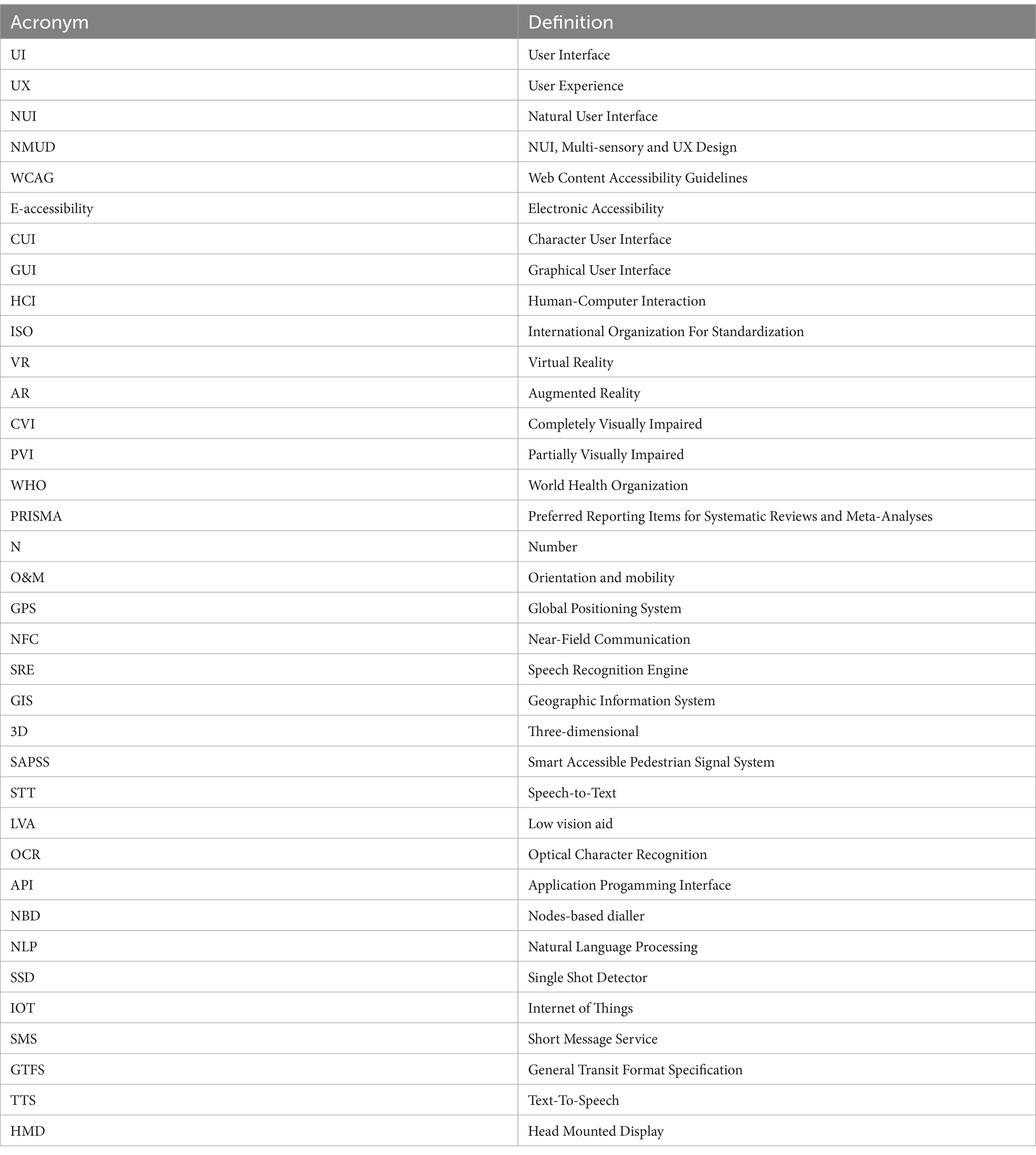
Table A1. List of abbreviations used in the manuscripts along with their full form.
Keywords: user experience, user interface, human–computer interaction, visually impaired, digital health
Citation: Arora L, Choudhary A, Bhatt M, Kaliappan J and Srinivasan K (2024) A comprehensive review on NUI, multi-sensory interfaces and UX design for applications and devices for visually impaired users. Front. Public Health. 12:1357160. doi: 10.3389/fpubh.2024.1357160
Edited by:
Costina Ruxandra Poetar, Babeș-Bolyai University, RomaniaReviewed by:
Raluca Balan, Babeș-Bolyai University, RomaniaRicardo Valentim, Federal University of Rio Grande do Norte, Brazil
Filippo Amore, Fondazione Policlinico Universitario Agostino Gemelli-IRCCS, Italy
Copyright © 2024 Arora, Choudhary, Bhatt, Kaliappan and Srinivasan. This is an open-access article distributed under the terms of the Creative Commons Attribution License (CC BY). The use, distribution or reproduction in other forums is permitted, provided the original author(s) and the copyright owner(s) are credited and that the original publication in this journal is cited, in accordance with accepted academic practice. No use, distribution or reproduction is permitted which does not comply with these terms.
*Correspondence: Jayakumar Kaliappan, amF5YWt1bWFyLmtAdml0LmFjLmlu
†These authors have contributed equally to this work and share first authorship